



**Disclosure: Virto Calendar App is one of the products reviewed in this article. We’ve made every effort to provide a fair, factual comparison of every solution listed here, including honest limitations of our own products.
If you manage a SharePoint Online environment, you’ve almost certainly run into the platform’s calendar problem. The native Events web part lacks a monthly view. The Group Calendar web part only surfaces M365 Group calendars. And the classic Calendar list — the one with overlay support that people actually liked — doesn’t work on modern pages at all.
None of these options give you what most organizations need: a modern, full-featured calendar that can pull in events from SharePoint lists, Exchange mailboxes, Planner, and external sources — all in one place.
We tested six calendar solutions that work on modern SharePoint Online pages and compared them across features, pricing, ease of setup, and data source support. Our evaluation criteria included modern UI support, multi-source overlay capability, data source variety, Microsoft Teams integration, pricing transparency, and setup complexity.
Our verdict: Virto Calendar App is our top recommendation for enterprise multi-source overlay, offering the widest data source support and the most view options. Virto Shared Calendar is the best option for lightweight external sharing with anonymous access. For a strong third-party runner-up, Bamboo Calendar Plus is a proven, established alternative.
Why SharePoint Online Needs a Better Calendar
SharePoint Online ships with three built-in calendar options, and each one falls short in a different way.
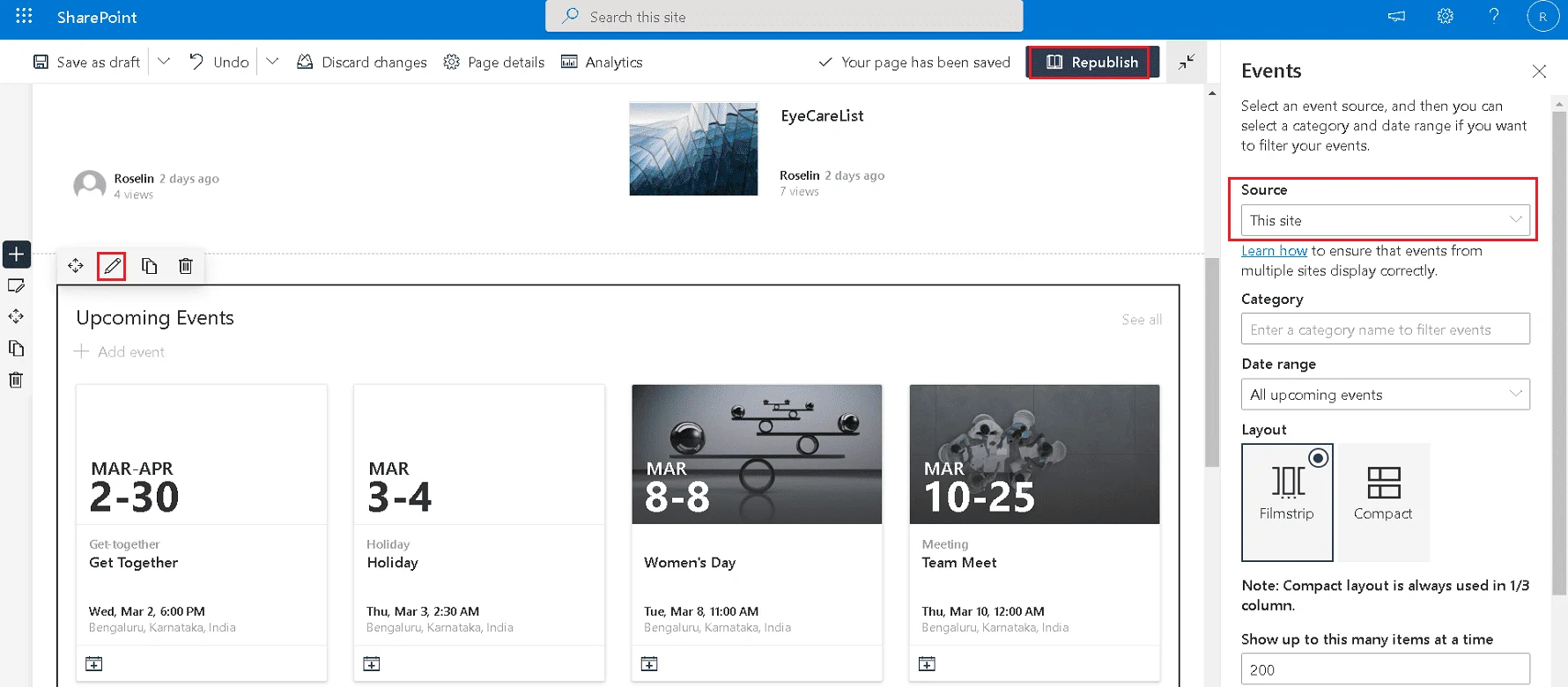
The Events web part is the default calendar experience on modern pages. It connects to a single SharePoint list and displays events in a compact agenda-style layout. There’s no monthly grid view, no overlay from other sources, and no drag-and-drop editing. For anything beyond a basic event listing, it runs out of capability quickly.
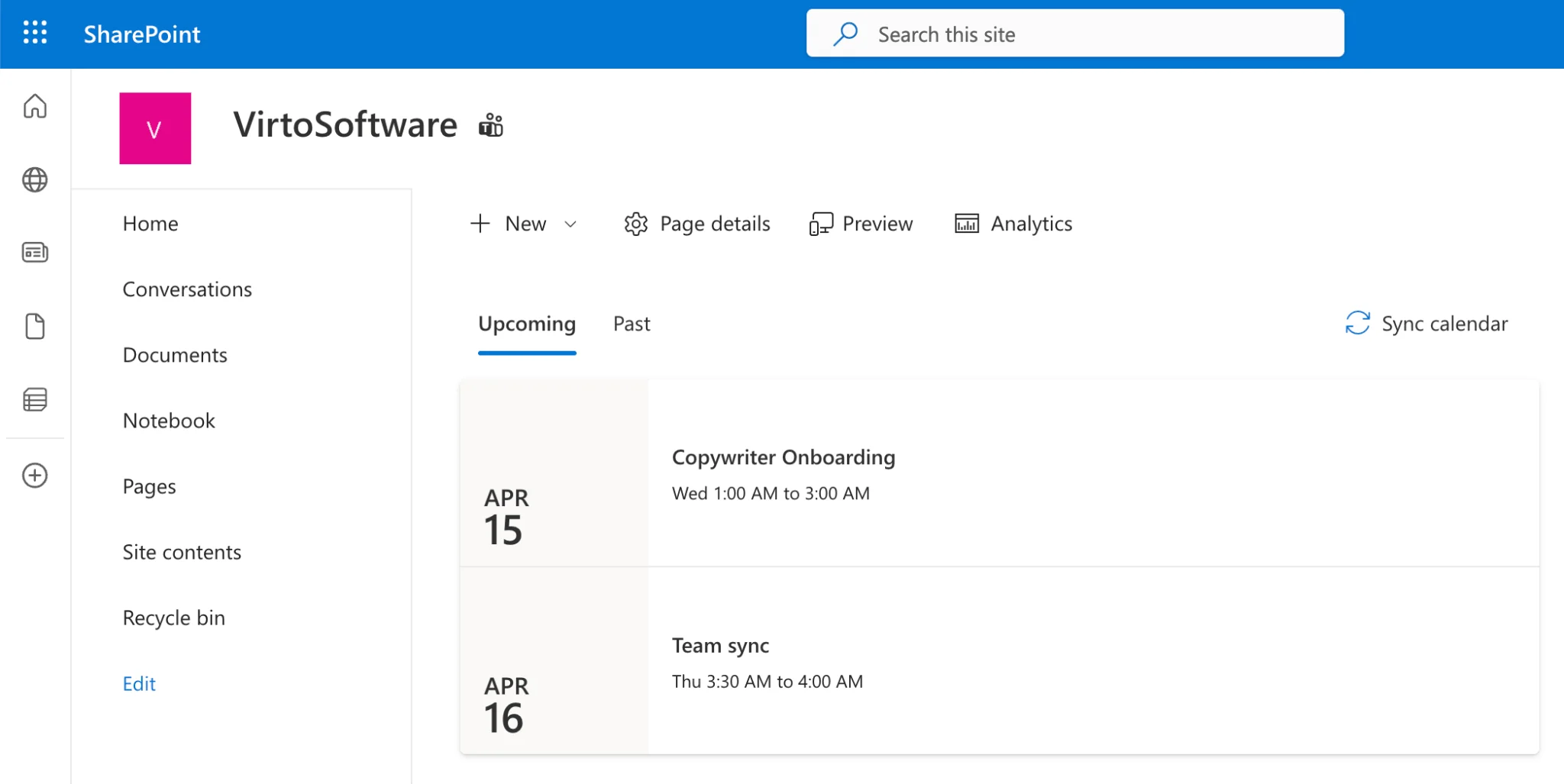
The Group Calendar web part pulls events from an M365 Group calendar, which means it can surface Outlook meetings for a team. But it’s limited to that single group — no overlay, no SharePoint list support, and no connection to Planner or external calendars.
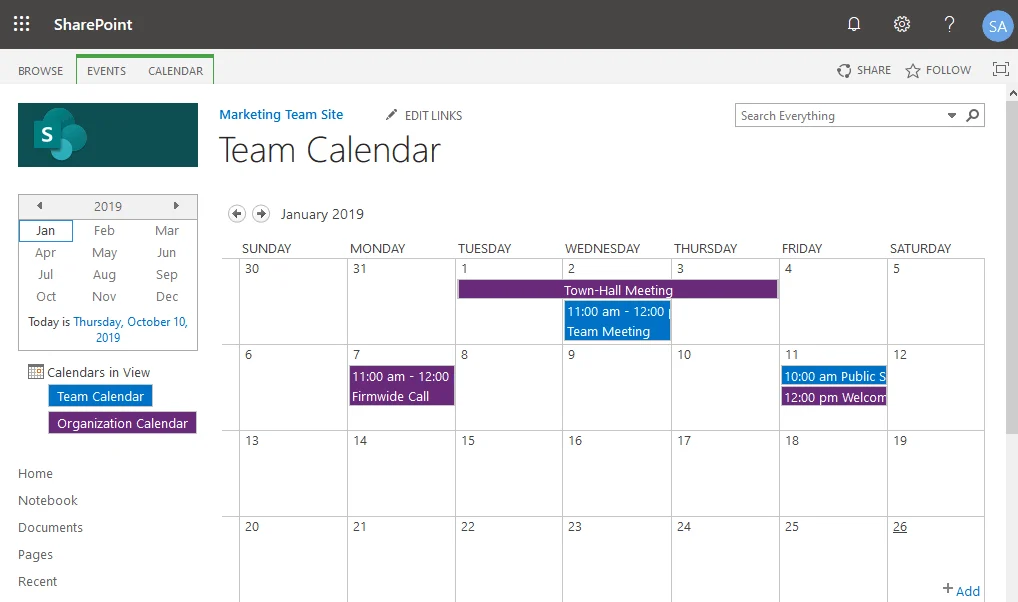
The classic Calendar list with overlay views was the closest thing SharePoint ever had to a real calendar solution. It supported overlaying up to ten color-coded calendars from different SharePoint lists or Exchange mailboxes. The problem: it runs on the classic page framework and Microsoft has never ported it to modern pages.
The core gap is clear: no single native solution offers a modern UI, multi-source overlay, and Exchange integration together. And while Microsoft has invested heavily in the Teams calendar experience, SharePoint’s on-page calendar tools haven’t seen meaningful improvement in years.
| Capability | Events Web Part | Group Calendar WP | Classic Calendar Overlay |
|---|---|---|---|
| Modern page support | ✓ | ✓ | ✗ |
| Monthly grid view | ✗ | ✗ | ✓ |
| Multi-source overlay | ✗ | ✗ | ✓ (up to 10) |
| Exchange / Outlook | ✗ | ✓ (group only) | ✓ |
| SharePoint Lists | ✓ (single) | ✗ | ✓ |
| Drag-and-drop | ✗ | ✗ | ✓ |
| Color-coding | ✗ | ✗ | ✓ |
How We Evaluated These Calendar Solutions
We tested each solution in a standard Microsoft 365 tenant with a mix of SharePoint lists, Exchange mailboxes, and Planner boards. Our evaluation was qualitative, based on hands-on setup and daily use — not vendor claims.
Here’s what we looked at: whether the app works on modern SharePoint pages, its overlay capability across multiple data sources, the variety of sources it can connect to (SharePoint, Exchange, Planner, iCal, external), available view modes (month, week, day, Gantt, timeline), Microsoft Teams integration, pricing transparency and free tier availability, and the complexity of initial setup and configuration.
The 6 Best Calendar Alternatives for SharePoint Online
#1 Virto Calendar App — Best for Enterprise Multi-Source Overlay
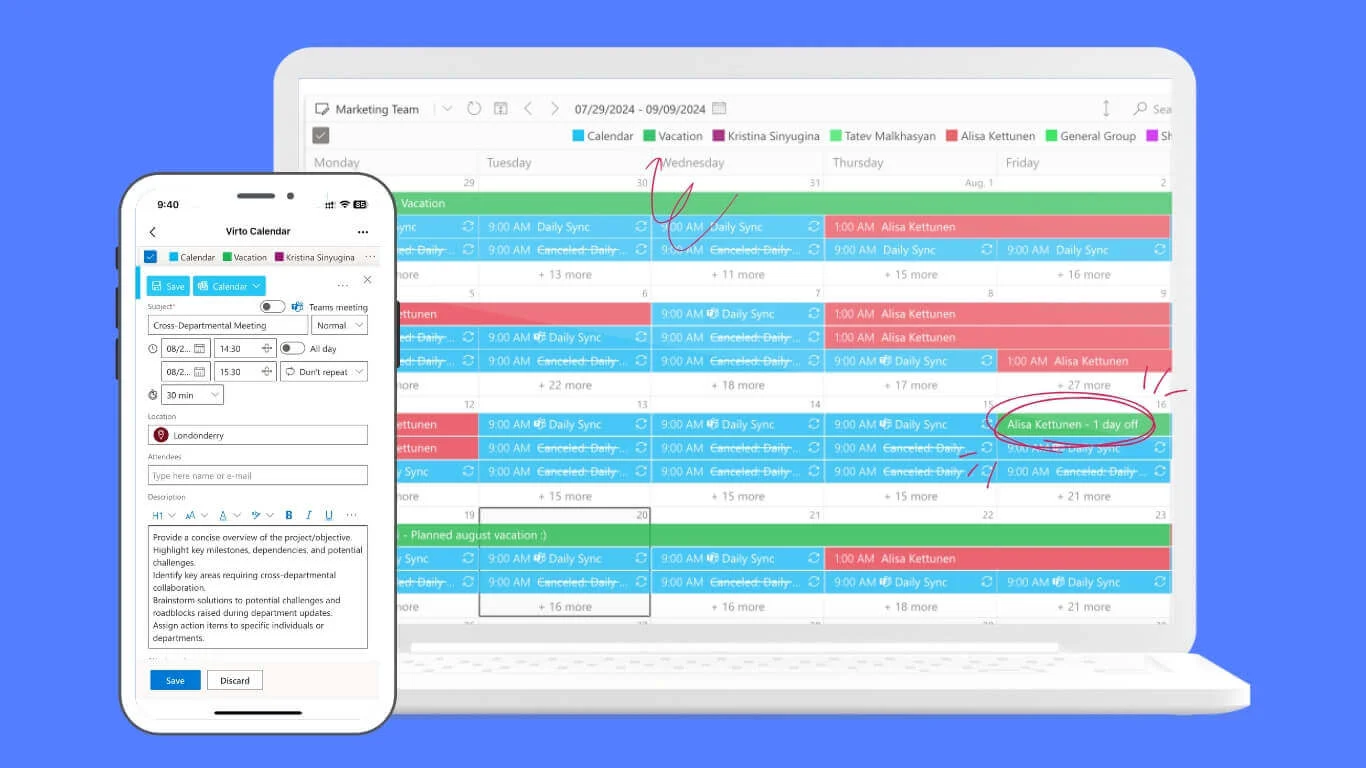
Virto Calendar App is the most feature-dense calendar solution available for SharePoint Online. Its defining advantage is data source breadth: it connects to SharePoint lists, Exchange and Outlook mailboxes, meeting rooms, Microsoft Planner, and external calendars via iCal — including Google Calendar. And it can pull these sources from any site collection, not just the current one.
The app offers eight distinct view modes: Day, Week, Work Week, Month, Year, Task, Gantt, and a multi-source side-by-side view. The Gantt view is particularly useful for project-oriented teams that want to see task timelines alongside meeting schedules. Color-coding is automatic by source, and events support drag-and-drop rescheduling.
For organizations with data residency requirements, Virto offers a self-hosted Azure deployment model, meaning calendar data stays within your own infrastructure. The app also integrates with Microsoft Teams as a channel tab.
Limitations to note: Virto Calendar App does not currently integrate with Viva Connections — if that’s a priority, Lightning Conductor is the better fit. Setup for Exchange data sources requires admin-level permissions. And at $2,412 a year per 100 users with a 3-year agreement, it’s not the cheapest option on this list.
Best for: Enterprise organizations that need to overlay calendars from multiple Microsoft 365 services and external sources on a modern SharePoint page.
Pricing: $2,412 per 100 users per year with a 3-year agreement (100 users and up), with a 30-day free trial.
#2 Virto Shared Calendar — Best for External Sharing & Small Teams
Virto Shared Calendar solves a different problem than the Virto Calendar App: sharing calendars with people outside your organization. It provides anonymous access links, meaning external users — clients, vendors, contractors — can view and interact with a shared calendar without needing a Microsoft account.
Cross-tenant sharing works without Azure AD federation, which removes a significant IT hurdle for multi-organization collaboration. The app runs in SharePoint, Microsoft Teams, and Outlook, and also offers a standalone web interface.
The free tier is generous: it’s free forever for up to 15 calendar entries for each user, which is enough for small teams or project-specific use cases.
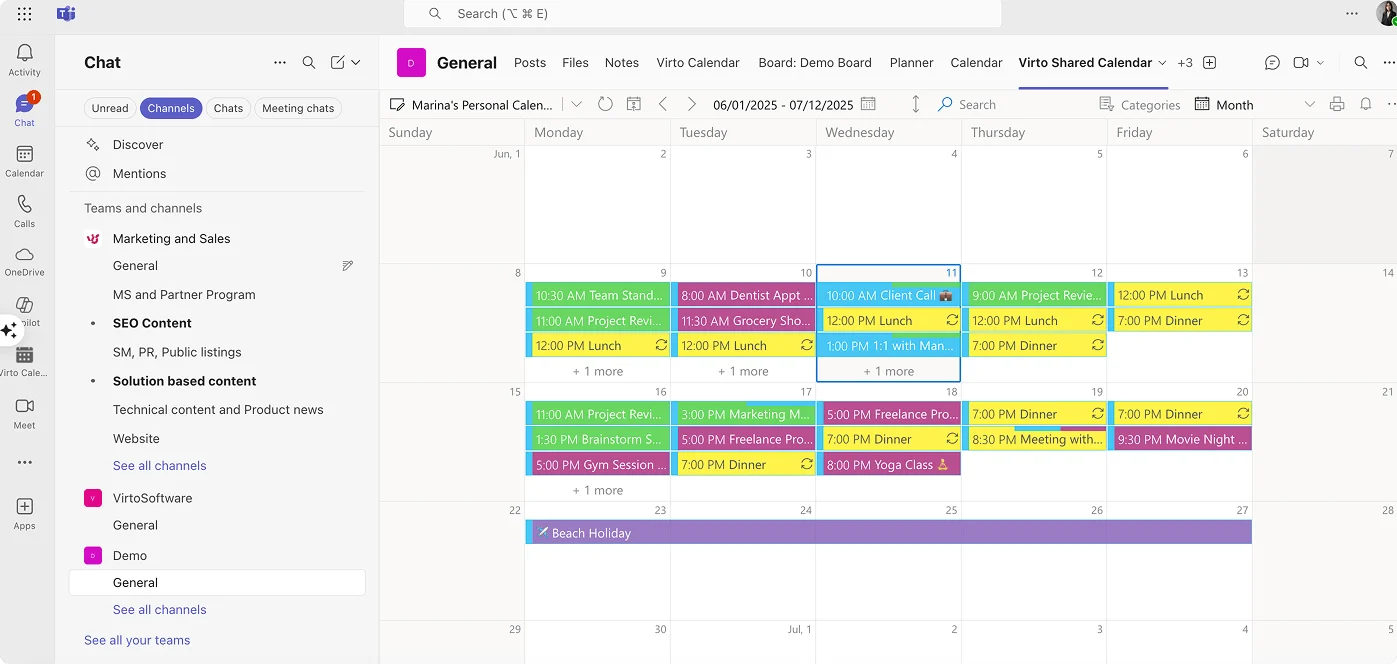
Limitations to note: Virto Shared Calendar is not designed for multi-source overlay — it’s a shared calendar tool, not an aggregation tool. View options are also more limited compared to the Virto Calendar App.
Best for: Small teams, agencies, and organizations that need to share calendars with external users who don’t have Microsoft 365 accounts.
Pricing: Free forever (up to 15 calendar entries for each user); Team plan starts at $99/year.
#3 Lightning Conductor — Best for Viva Connections Integration
Lightning Conductor stands out for its deep integration with Microsoft Viva Connections, making it the best option for organizations that have adopted the Viva ecosystem as their primary employee experience platform.
The app supports SharePoint lists, M365 Group calendars, Teams channel calendars, and Microsoft Planner as data sources. It includes a timeline view and conditional formatting for color-coding events based on metadata values.
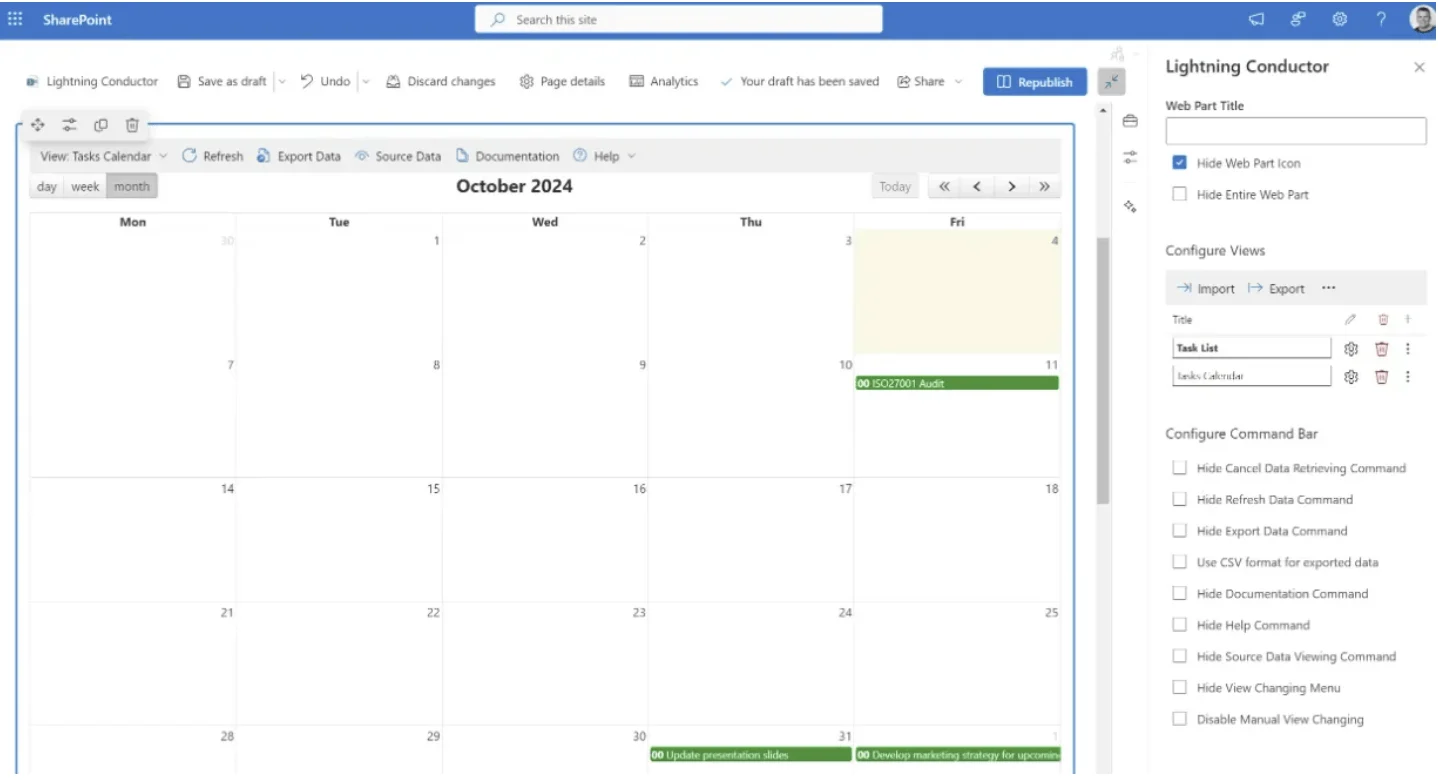
Limitations to note: Lightning Conductor does not support direct Exchange or Outlook mailbox overlay. It accesses group calendars through the Microsoft Graph API, which covers M365 Groups but not individual user mailboxes. Pricing is not publicly listed — you need to contact the vendor.
Best for: Organizations heavily invested in Viva Connections that need calendar aggregation within the Viva ecosystem.
Pricing: Perpetual from: $1598 for 100 users to $7998 for unlimited users. Subscription from: $799 per year for 100 users to $3999 per year for unlimited users.
#4 Bamboo Calendar Plus — Solid All-Rounder
Bamboo Calendar Plus (from Rencore, which acquired Bamboo Solutions) is one of the longest-standing SharePoint calendar products on the market. It has a proven track record and a stable feature set that covers the core needs well.
The app supports both SharePoint list calendars and Exchange calendar overlay, with color-coding and the ability to view multiple sources on a single page. Its interface is familiar and straightforward.
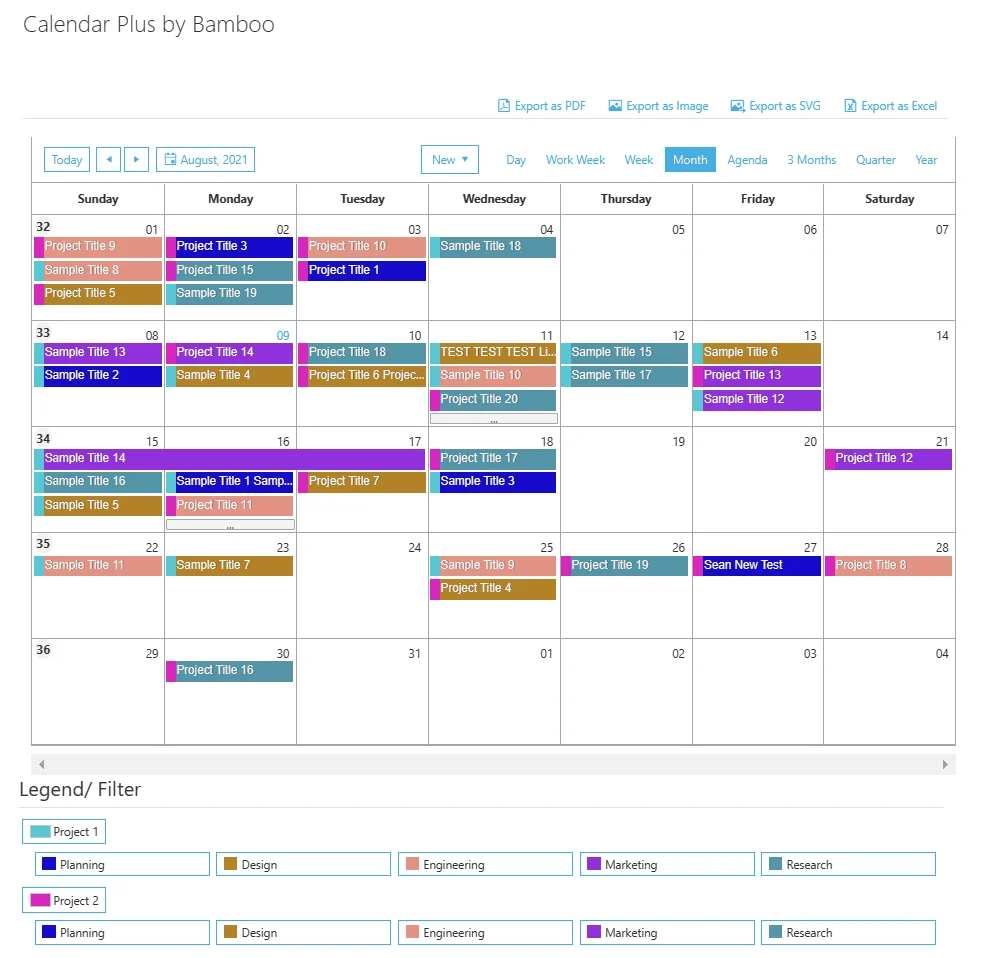
Limitations to note: Bamboo Calendar Plus supports fewer data source types than Virto — there’s no native Planner, iCal, or Google Calendar integration. Product updates have also been less frequent than some newer competitors.
Best for: Mid-market organizations seeking a proven, established calendar overlay solution with solid SharePoint and Exchange support.
Pricing: Perpetual license one-time purchase $3,995.
#5 BoostSolutions Calendar Rollup — Budget-Friendly Option
BoostSolutions Calendar Rollup is available directly through the Microsoft AppSource marketplace, which simplifies procurement and IT approval. It supports SharePoint list calendars and M365 Group calendars, with agenda and monthly view options.
The app includes a 30-day free trial, giving you enough time to test it in a real environment before committing.
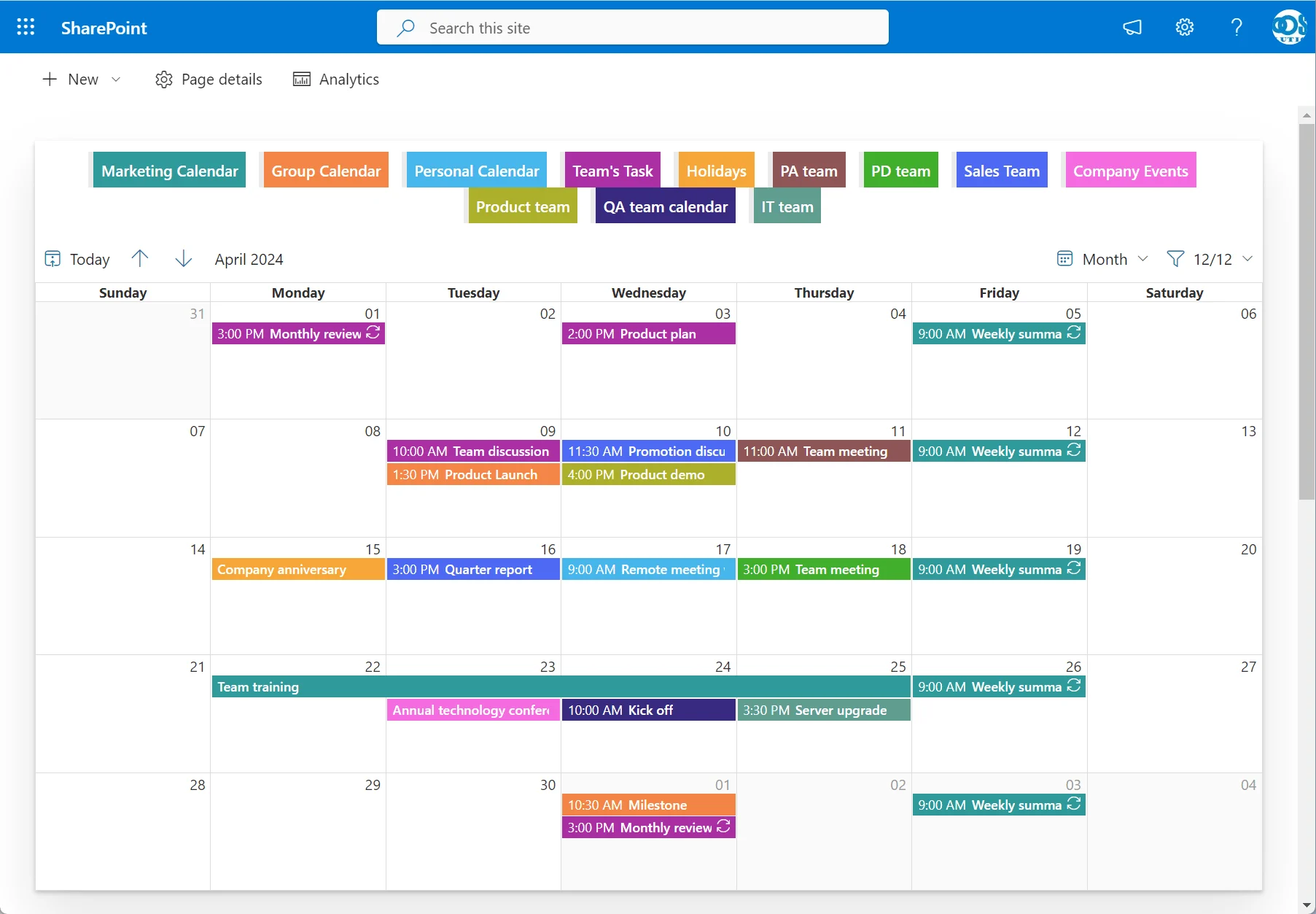
Limitations to note: Data source variety is limited — it’s primarily SharePoint-centric, with no direct Exchange mailbox or external iCal support. You also can’t create Teams meetings directly from the calendar interface.
Best for: Budget-conscious teams that need basic calendar aggregation from SharePoint sources.
Pricing: 30-day free trial; $399/mo site subscription, $1199/mo tenant subscription.
#6 Cloudwell Calendar Overlay — Newcomer to Watch
Cloudwell Calendar Overlay is a newer entrant built on modern SharePoint Framework (SPFx) architecture. It supports overlay from Outlook, Teams, Planner, SharePoint, and third-party sources, all through a Graph-first approach.
The product received a notable endorsement from Microsoft’s Vesa Juvonen in a PnP partner showcase, which speaks to its technical approach. A 15-day free trial is available.
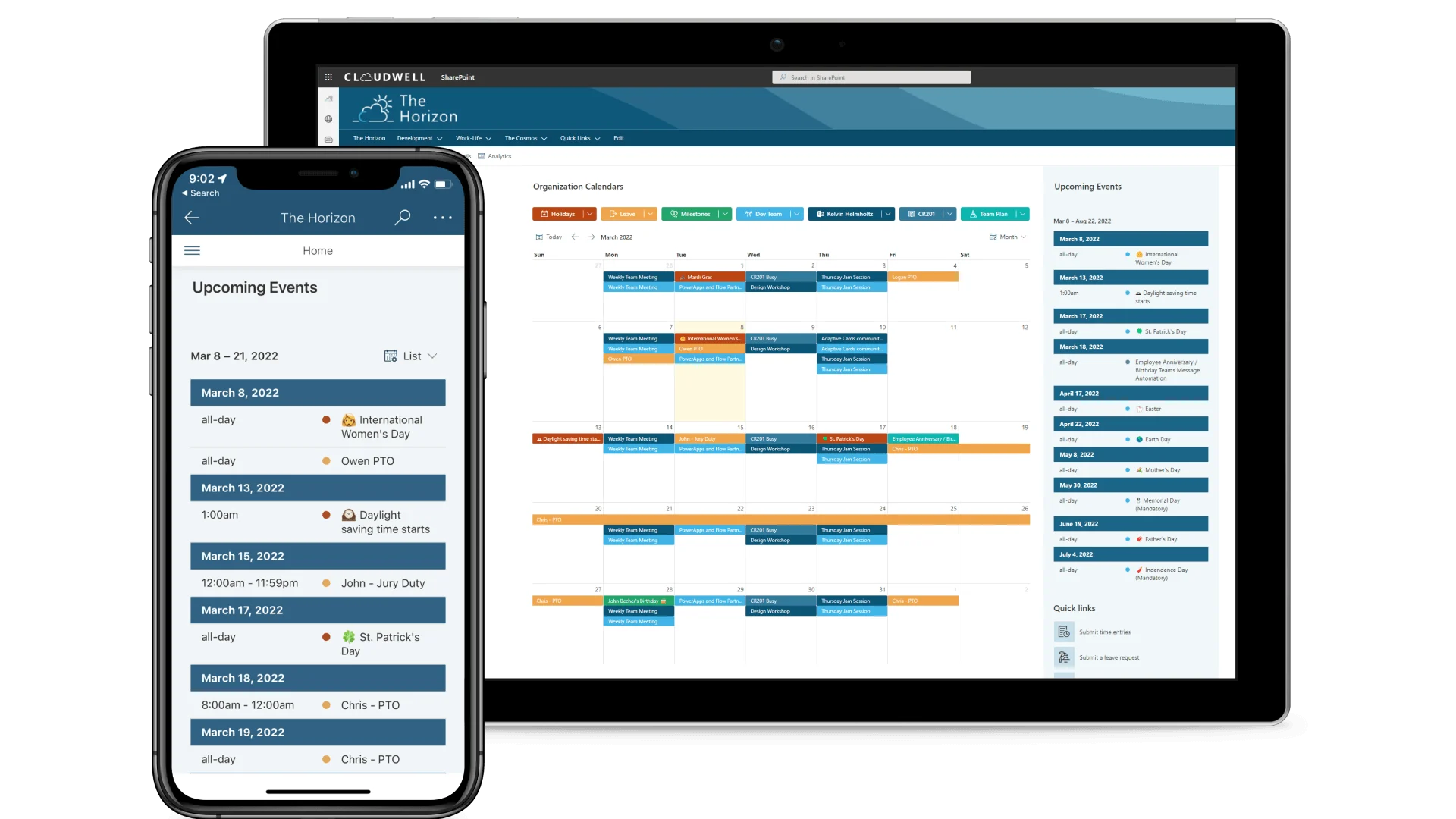
Limitations to note: As a newer product, Cloudwell has a smaller install base and less community documentation than established solutions.
Best for: Organizations that want a modern, Graph-API-first approach to calendar overlay from a promising newer vendor.
Pricing: From $250 per year for 5 users.
Side-by-Side Comparison Table
This is the full feature matrix across all solutions reviewed — native and third-party.
| Feature | Events WP | Group Cal | Classic | Virto Calendar | Virto Shared | Lightning C. | Bamboo Cal+ | Boost Sol. | Cloudwell |
|---|---|---|---|---|---|---|---|---|---|
| Modern page support | ✓ | ✓ | ✗ | ✓ | ✓ | ✓ | ✓ | ✓ | ✓ |
| Multi-source overlay | ✗ | ✗ | ✓ | ✓ | ✗ | ✓ | ✓ | ✓ | ✓ |
| SharePoint Lists | ✓ | ✗ | ✓ | ✓ | ✗ | ✓ | ✓ | ✓ | ✓ |
| Exchange / Outlook | ✗ | Group | ✓ | ✓ | ✗ | Group | ✓ | ✗ | ✓ |
| iCal / Google Calendar | ✗ | ✗ | ✗ | ✓ | ✗ | ✗ | ✗ | ✗ | Via 3rd-party |
| Microsoft Planner | ✗ | ✗ | ✗ | ✓ | ✗ | ✓ | ✗ | ✗ | ✓ |
| Meeting Rooms | ✗ | ✗ | ✗ | ✓ | ✗ | ✗ | ✗ | ✗ | ✗ |
| SQL / XML / Salesforce | ✗ | ✗ | ✗ | ✓ | ✗ | ✗ | ✗ | ✗ | ✗ |
| Gantt view | ✗ | ✗ | ✗ | ✓ | ✗ | ✗ | ✗ | ✗ | ✗ |
| Monthly / Weekly views | ✗ / ✗ | ✗ / ✗ | ✓ / ✓ | ✓ / ✓ | ✓ / ✓ | ✓ / ✓ | ✓ / ✓ | ✓ / ✗ | ✓ / ✓ |
| Color-coding | ✗ | ✗ | ✓ | ✓ | ✓ | ✓ | ✓ | ✗ | ✓ |
| Drag-and-drop | ✗ | ✗ | ✓ | ✓ | ✗ | ✗ | ✓ | ✗ | ✗ |
| Teams integration | ✗ | ✗ | ✗ | ✓ | ✓ | ✓ | ✗ | ✗ | ✗ |
| Anonymous sharing | ✗ | ✗ | ✗ | ✗ | ✓ | ✗ | ✗ | ✗ | ✗ |
| Cross-tenant sharing | ✗ | ✗ | ✗ | ✗ | ✓ | ✗ | ✗ | ✗ | ✗ |
| Free tier | Native | Native | Native | ✗ | 15 entries | ✗ | ✗ | 30-day | 15-day |
| Starting price | Free | Free | Free | $2,412/yr 100 users | $99/yr | $799/yr 100 users | $3995 | From $399/mo | $250/yr 5 users |
Which Calendar Should You Choose?
With six third-party options and three native tools, the right choice depends on what you actually need. Here’s a quick decision framework.
| If you need… | Recommended solution |
|---|---|
| Multi-source overlay for enterprise | Virto Calendar App |
| Sharing calendars with external users | Virto Shared Calendar |
| Viva Connections integration | Lightning Conductor |
| Proven SharePoint + Exchange overlay | Bamboo Calendar Plus |
| Budget-friendly basic aggregation | BoostSolutions Calendar Rollup |
| Modern Graph-API-first approach | Cloudwell Calendar Overlay |
| Native only, no third-party apps | Group Calendar web part |
For most organizations, the decision comes down to scope. If you need a single calendar widget for one SharePoint list, native tools may be enough. Once you need overlay from multiple sources — especially Exchange mailboxes, Planner boards, or external calendars — a third-party solution becomes necessary.
Frequently Asked Questions
What is the best free calendar app for SharePoint Online?
Virto Calendar App offers a free monthly trial with full functionality — no feature restrictions. Virto Shared Calendar is free forever for up to 15 calendar entries. BoostSolutions Calendar Rollup provides a 30-day free trial, and Cloudwell offers 15 days. For truly free long-term use, Virto Shared Calendar is the only one of these with a permanent free tier; Virto Calendar App is trial-only.
Can I replace the classic SharePoint calendar on modern pages?
The classic SharePoint calendar with overlay views does not work on modern pages, and Microsoft has not announced plans to port it. Third-party apps like Virto Calendar App and Lightning Conductor provide the closest equivalent on modern pages, with overlay capabilities that match or exceed what the classic calendar offered.
Which SharePoint calendar apps support Exchange and Outlook integration?
Virto Calendar App, Cloudwell Calendar Overlay, and Bamboo Calendar Plus all support direct Exchange and Outlook calendar overlay. Lightning Conductor accesses M365 Group calendars through the Microsoft Graph API but does not support direct Exchange mailbox overlay.
Is there a calendar app for SharePoint with a Gantt chart view?
Virto Calendar App is the only solution in this comparison that includes a Gantt view. It’s available alongside Day, Week, Work Week, Month, Year, Task, and multi-source side-by-side views — eight views total.
Do any SharePoint calendar alternatives work in Microsoft Teams?
Virto Calendar App can be added directly as a Microsoft Teams channel tab. Virto Shared Calendar also works within Teams. For Teams-first organizations, Virto offers a dedicated product — Virto Calendar App for Teams (Virto Calendar Pro) — designed specifically for the Teams environment.
Get Started
For most organizations evaluating calendar solutions for SharePoint Online, Virto Calendar App offers the strongest combination of data source breadth, view flexibility, and enterprise-grade features. It’s the only solution in this comparison that supports SharePoint, Exchange, Planner, meeting rooms, and external calendars — all on modern pages.
Try Virto Calendar free | Book a demo for enterprise evaluation
We update this comparison annually to reflect new features, pricing changes, and new entrants to the market. Bookmark this page and check back for the latest.