Home>
Blog>
Kanban Board Pro by Virto: New Authorization Process
Kanban Board Pro by Virto: New Authorization Process
Reading Time: 3 mins
The Kanban Board Pro by Virto for SharePoint and Microsoft Teams was updated. Find the details in this post.
We are excited to announce a new release of our Kanban Board Pro by Virto for SharePoint with an improved interface and with the addition of new features.
A new authorization process that will help improve administration has been planned for our current and new users. You will find a step-by-step guide for successful authorization below.
1) The guide for new users of the Kanban Board Pro by Virto
Start with the installation of the app on the SharePoint site. Find the app in SharePoint apps and click “Add.”
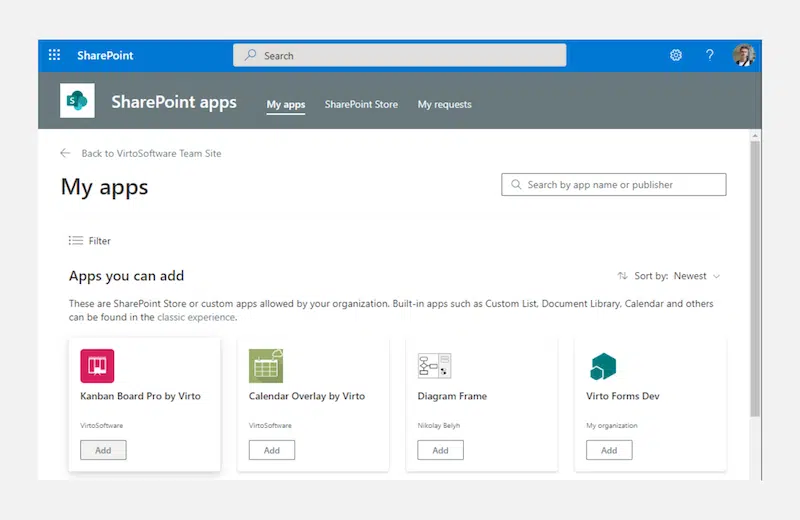
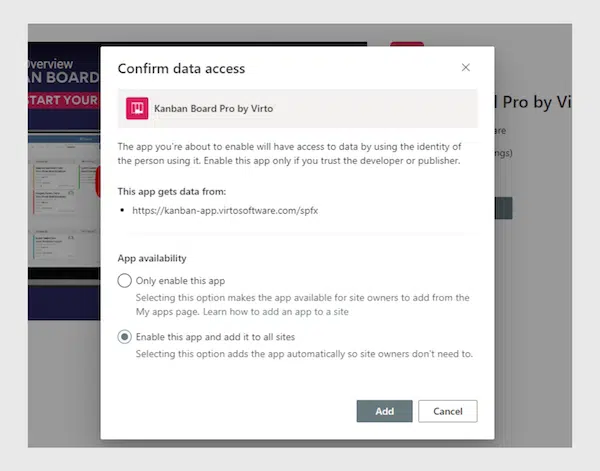
Then “Confirm data access” window will pop up. Kanban Board Pro can be added to all tenant sites (second option) or just allowed to be added by a SharePoint administrator (first option).
If the first option (Only enable this app) is selected, you will need to add an app to each site where you want to use it.
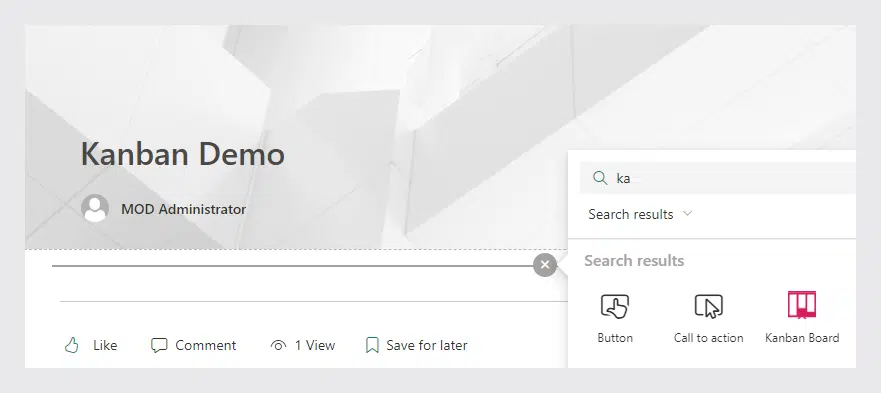
Then add the Kanban Board Pro by Virto to a SharePoint site page. To accomplish it, switch to the edit mode and choose the Kanban Board Pro.
The next step will be to go through the authorization process described in the section “The guide for current users of Kanban Board Pro” below.
2) The guide for current users of the Kanban Board Pro
The first thing you may see on your Kanban Board Platform is the “Authorization Requirement” alert.
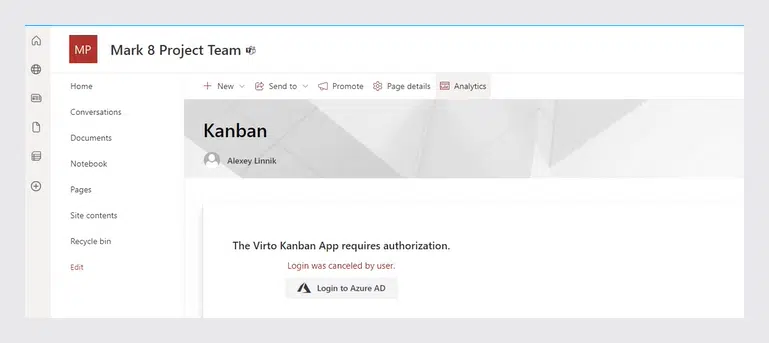
If you have tenant administrator rights, click “Login to Azure AD.”
If you don’t have tenant administrator rights, ask your administrator to perform this and follow the steps on behalf of users.
A “Permission Requested” message will appear on your screen on the next step. Choose the “Consent on behalf of your organization” checkbox and click “Accept.”
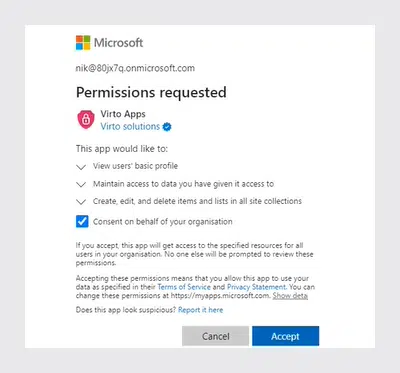
After the successful authorization process, you will find the page with the Kanban Board on it. Now you can enjoy the new attractive interface and add it to Microsoft Teams with its new features.
Please note that with the new update the Kanban Board Pro will no longer be presented in the SharePoint site content. You can add it to a SharePoint site page or insert a direct link to a particular board to SharePoint quick launch panel.
Note: if you use Calendar Overlay Pro and has already given permission to this app, you won’t need to do it for Kanban Board Pro.
If you need any help with Kanban Board Pro authorization, don’t hesitate to get in touch with our support team at support@virtosoftware.com or submit a ticket.
[{"cat":"News","date":"July 29, 2026","image":"/images/uploads/2026/07/virto-calendar-app-teams-outlook-microsoft-365-cover.webp","title":"Virto Calendar App now opens right inside Teams, Outlook, and Microsoft 365","url":"/news/virto-calendar-app-teams-outlook-microsoft-365/"},{"cat":"News","date":"June 8, 2026","image":"/images/uploads/2026/06/deploy-virtosoftware-in-own-azure-tenant-cover.webp","title":"How to Deploy VirtoSoftware Apps in Your Own Azure Tenant","url":"/news/deploy-virtosoftware-in-own-azure-tenant/"},{"cat":"News","date":"June 1, 2026","image":"/images/uploads/2026/06/ai-schedule-virto-calendar-color-coding-cover.webp","title":"Build Any Schedule with AI — and See It Color-Coded in Virto Calendar","url":"/news/ai-schedule-virto-calendar-color-coding/"},{"cat":"News","date":"April 28, 2026","image":"/images/uploads/2026/04/zero-trust-microsoft-365-deployment-cover.webp","title":"Compliance Without Compromise: Why a Zero-Trust Deployment Model Beats the SaaS Audit Trap","url":"/news/zero-trust-microsoft-365-deployment/"},{"cat":"News","date":"March 11, 2026","image":"/images/uploads/2026/03/SharePoint-Online-Add-Ins-die-April-2-2026.-2-2.png","title":"SharePoint Online Add-Ins Retired April 2, 2026 — VirtoSoftware Apps Remain Unaffected","url":"/news/sharepoint-online-add-ins-retirement-virto-apps-unaffected/"},{"cat":"News","date":"March 10, 2026","image":"/images/uploads/2026/03/virto-ad-user-manager-2.png","title":"Virto Active Directory User \u0026 Password Manager: Now 5 Tools in One Powerful Solution","url":"/news/virto-ad-user-password-manager/"},{"cat":"News","date":"March 6, 2026","image":"/images/uploads/2026/03/linkedin-post-aws-4-2.png","title":"IT Sovereignty in 2026: Why On-Premise SharePoint Beats Cloud During Geopolitical Crises","url":"/news/it-sovereignty-on-premise-sharepoint-vs-cloud/"},{"cat":"News","date":"February 23, 2026","image":"/images/uploads/2026/02/Multiple-operations-2.png","title":"Virto Multiple Operations for SharePoint Online \u0026 M365 – Now Available!","url":"/news/virto-multiple-operations-m365-launch/"},{"cat":"News","date":"February 12, 2026","image":"/images/uploads/2026/02/virto-alerts-news-3.png","title":"Virto Alerts \u0026 Reminders Gets a Major Update — New Price and Powerful Admin Feature!","url":"/news/virto-alerts-new-price-admin-updates/"},{"cat":"News","date":"February 12, 2026","image":"/images/uploads/2026/02/Multiple-File-Op-web-part-2.png","title":"Virto Multiple File Operations: Now 73% More Affordable!","url":"/news/virto-multiple-file-operations-price-drop/"},{"cat":"News","date":"February 3, 2026","image":"/images/uploads/2026/02/Virto-Shared-Calendar-permissions-3-2.png","title":"New Update: Permissions Now Available in Virto Shared Calendar","url":"/news/new-permissions-virto-shared-calendar/"},{"cat":"News","date":"January 23, 2026","image":"/images/uploads/2026/01/Virto-Calendar-App-4.png","title":"Virto Calendar App Update: Persistent Category Filters Save Your Preferences","url":"/news/virto-calendar-persistent-category-filters/"},{"cat":"News","date":"January 15, 2026","image":"/images/uploads/2026/01/Alerts-new-3-2.png","title":"SharePoint Alerts Retirement: Your Complete Migration Guide for 2026","url":"/news/sharepoint-alerts-retirement-migration-guide/"},{"cat":"News","date":"December 22, 2025","image":"/images/uploads/2025/12/2025-wrap-2.png","title":"VirtoSoftware's 2025: A Year of Game-Changing Launches and Updates in M365 and SharePoint On-Premise","url":"/news/2025-year-in-review/"},{"cat":"News","date":"December 15, 2025","image":"/images/uploads/2025/12/secure-deployment-2.jpg","title":"When Security Comes First: Deploy VirtoSoftware Apps in Your Own Microsoft 365 Environment","url":"/news/deploy-virto-in-your-m365-environment/"},{"cat":"News","date":"November 26, 2025","image":"/images/uploads/2025/11/Product-Overview-Virto-Workflow-Automation-2.png","title":"Product Overview: Virto Workflow Automation","url":"/news/virto-workflow-automation-sharepoint-onpremises/"},{"cat":"News","date":"September 22, 2025","image":"/images/uploads/2025/09/sharepoint-classic-alerts-retirement-virto-alternatives.jpeg","title":"Classic SharePoint Alerts Are Retiring—Virto Alerts Has You Covered","url":"/news/sharepoint-classic-alerts-retirement-virto-alternatives/"},{"cat":"News","date":"September 15, 2025","image":"/images/uploads/2025/09/virto-multiple-file-operations-cross-site.jpeg","title":"Virto Multiple File Operations: Copy \u0026 Move Across Site Collections","url":"/news/virto-multiple-file-operations-cross-site/"},{"cat":"News","date":"September 7, 2025","image":"/images/uploads/2025/09/Image-12.jpeg","title":"Virto Calendar: Smoother Mobile Editing Experience","url":"/news/virto-calendar-mobile-editing-update/"},{"cat":"News","date":"August 27, 2025","image":"/images/uploads/2025/09/virto-shared-calendar-ics-support.jpeg","title":"Virto Shared Calendar Update: Full .ICS \u0026 iCalendar Feed Support!","url":"/news/virto-shared-calendar-ics-support/"},{"cat":"News","date":"May 21, 2025","image":"/images/uploads/2025/05/Virto-Shared-Calendar-2.png","title":"Introducing Virto Shared Calendar: Effortless Scheduling for Teams, Clients, and Beyond","url":"/news/virto-shared-calendar-launch/"},{"cat":"News","date":"May 6, 2025","image":"/images/uploads/2025/05/News-4.jpg","title":"Welcome Skype Users to Microsoft Teams: Tips \u0026 Tools to Get You Started","url":"/news/welcome-skype-users-to-teams/"},{"cat":"News","date":"April 21, 2025","image":"/images/uploads/2025/04/News-alerts-2.jpg","title":"Virto Alerts \u0026 Reminder App Is Back and Fully Functional — Get Notified Seamlessly!","url":"/news/virto-alerts-reminder-app-is-back-and-fully-functional/"},{"cat":"News","date":"March 20, 2025","image":"/images/uploads/2025/03/News-3-2.jpg","title":"Supercharge Your SharePoint On-Premises: Introducing Virto Multiple File Operations","url":"/news/multiple-file-operations-sharepoint-on-premise/"},{"cat":"News","date":"February 14, 2025","image":"/images/uploads/2025/02/Microsoft-Teams-update-2.jpg","title":"Teams Update Causes Virto Calendar App Issues: Here's How to Fix It","url":"/news/virto-calendar-workaround-teams/"},{"cat":"News","date":"February 7, 2025","image":"/images/uploads/2025/02/News-2.jpg","title":"What's New in Virto Calendar? Optional Attendees, Agenda Printing, and More!","url":"/news/virto-calendar-forms-slideshow-updates/"},{"cat":"News","date":"January 27, 2025","image":"/images/uploads/2025/01/Virto-Cal-News-4-2.jpg","title":"What’s New in Virto Calendar? Approvals, Planner Management, and More! ","url":"/news/virto-calendar-news-approvals-ms-planner/"},{"cat":"News","date":"November 7, 2024","image":"/images/uploads/2024/11/updates.webp","title":"Virto Calendar Update: iCal Flexibility, Multisource View, Dark Mode \u0026 More!","url":"/news/virto-calendar-updates-nov-2024/"},{"cat":"News","date":"September 20, 2024","image":"/images/uploads/2024/09/new-virto-calendar-features-2.jpg","title":"Virto Calendar Just Got Smarter: Explore New Permissions and Views","url":"/news/new-views-in-virto-calendar/"},{"cat":"News","date":"July 10, 2024","image":"/images/uploads/2024/07/New-Website-1920x1080-1.png","title":"VirtoSoftware's Website Makeover: Sleek Design \u0026 Performance","url":"/news/virtosoftware-website-makeover/"},{"cat":"News","date":"May 17, 2024","image":"/images/uploads/2024/06/Virto-Calendar-App-Update_-Enhanced-Note-Functionality.jpg","title":"Virto Calendar App Update: Enhanced Note Functionality","url":"/news/enhanced-note-functionality/"},{"cat":"News","date":"April 18, 2024","image":"/images/uploads/2024/06/New-Virto-Calendar-is-out.jpg","title":"New Virto Calendar is out!","url":"/news/new-virto-calendar-is-out/"},{"cat":"News","date":"March 20, 2024","image":"/images/uploads/2024/06/First-to-Witness_-The-New-Virto-Calendar-and-Its-Fresh-Features.jpg","title":"First to Witness: The New Virto Calendar and Its Fresh Features","url":"/news/first-to-witness-the-new-virto-calendar-and-its-fresh-features/"},{"cat":"News","date":"March 14, 2023","image":"/images/uploads/2024/06/Kanban-Board-Pro_-New-Notification-System.jpg","title":"Kanban Board Pro: New Notification System","url":"/news/new-notification-system-in-kanban-board-pro/"},{"cat":"News","date":"December 31, 2022","image":"/images/uploads/2024/06/Explore-VirtoSoftwares-2022-Archive-of-News-and-Product-Updates.jpg","title":"Explore VirtoSoftware’s 2022 Archive of News and Product Updates","url":"/news/2022/"},{"cat":"News","date":"August 24, 2022","image":"/images/uploads/2024/06/Calendar-Overlay-Pro-Update_-New-Authorization-Process.jpg","title":"Calendar Overlay Pro Update: New Authorization Process","url":"/news/calendar-app-new-authorization-process/"},{"cat":"News","date":"August 19, 2022","image":"/images/uploads/2024/06/New-Authorization-Process-for-Calendar-App.jpg","title":"New Authorization Process for Calendar App","url":"/news/new-authorization-process-for-calendar-app/"},{"cat":"News","date":"June 7, 2022","image":"/images/uploads/2024/03/20-Off-for-All-Virto-One-Bundles.jpg","title":"20% Off for All Virto One Bundles","url":"/news/20-discount-virtoone-june/"},{"cat":"News","date":"December 31, 2021","image":"/images/uploads/2024/06/Explore-VirtoSoftwares-2021-Archive-of-News-and-Product-Updates.jpg","title":"Explore VirtoSoftware’s 2021 Archive of News and Product Updates","url":"/news/2021/"},{"cat":"News","date":"April 7, 2021","image":"/images/uploads/2024/06/Bulk-File-Copy-Move_-April-Update.jpg","title":"Bulk File Copy Move: April Update","url":"/news/bulk-file-copy-move-april-update/"},{"cat":"News","date":"March 17, 2021","image":"/images/uploads/2024/06/Calendar-Overlay-Pro-Update_-New-Views-Navigational-Options.jpg","title":"Bulk File Downloader Update","url":"/news/bulk-file-downloader-update-mar21/"},{"cat":"News","date":"December 31, 2020","image":"/images/uploads/2024/06/Explore-VirtoSoftwares-2022-Archive-of-News-and-Product-Updates.jpg","title":"Explore VirtoSoftware’s 2020 Archive of News and Product Updates","url":"/news/2020/"},{"cat":"News","date":"December 31, 2019","image":"/images/uploads/2024/06/Explore-VirtoSoftwares-2022-Archive-of-News-and-Product-Updates.jpg","title":"Explore VirtoSoftware’s 2019-2012 Archive of News and Product Updates","url":"/news/2019-2012/"},{"cat":"News","date":"March 26, 2018","image":"/images/uploads/2024/06/Office-365-Forms-Designer-has-a-new-management-feature.jpg","title":"Office 365 Forms Designer has a new management feature","url":"/news/office-365-forms-designer-has-a-new-management-feature/"}]



