Virto Form Designerfor SharePoint On-Premises
Key features:

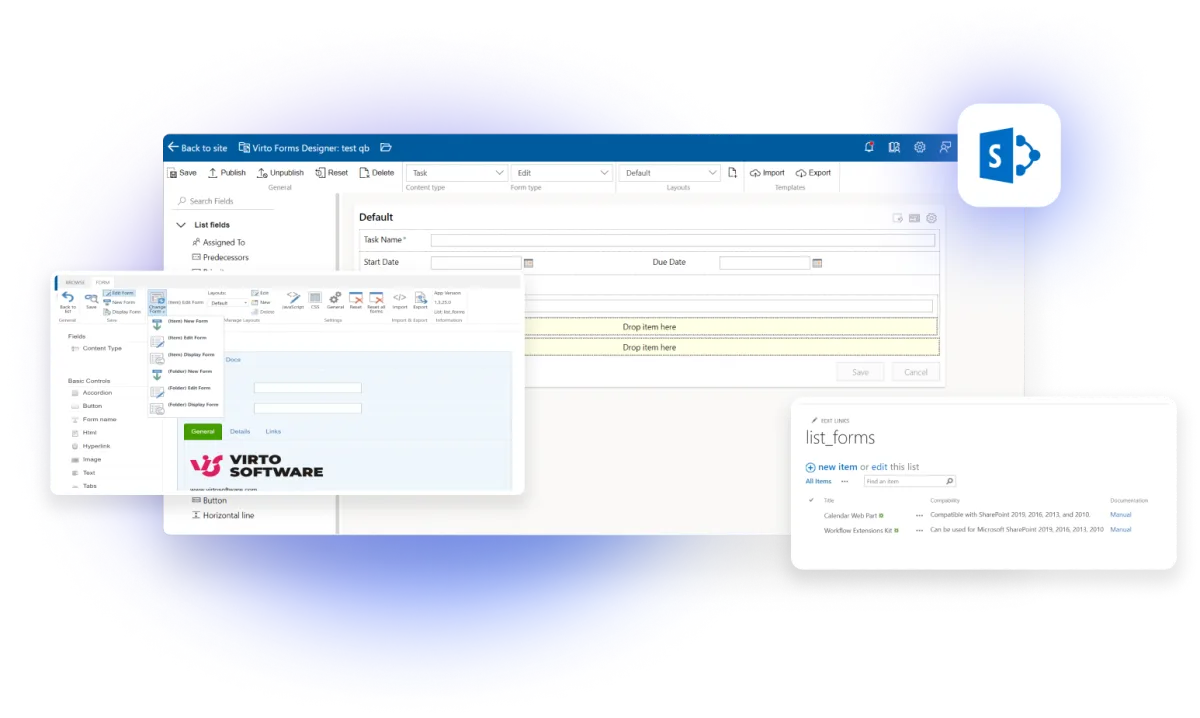
Comprehensive Design Tools
Access detailed customization with rich text formatting, HTML, CSS, and JavaScript editors.

Responsive Forms
Craft forms that are visually appealing and optimized for desktop use.

Various Form Views
Configure forms for New, Edit, and Display views, tailored to different content types for data handling.
How to install?
Your 24/7 library from our technical support team. Video guides, FAQs, troubleshooting articles, and more.
Talk to our team
Need clarity on our app's suitability for you? Set up a quick call with us or chat via Microsoft Teams chat to explore its potential for your needs.
Switching from InfoPath
InfoPath Forms Services isn't being force-removed from on-premises SharePoint the way it is from SharePoint Online. Microsoft draws that line explicitly: for SharePoint Server 2016, 2019, and Subscription Edition, extended support for InfoPath Forms Services ended after July 14, 2026 — the same date the InfoPath 2013 client and SharePoint Server 2016 and 2019 reached their own extended-support end. Forms built in InfoPath keep loading past that date; what stopped is Microsoft shipping fixes and patches. For new form design, Microsoft now names Power Apps as its recommended solution for SharePoint list forms. Virto Form Designer Web Part is a perpetual-license, on-premises alternative for that same job. It's built for:
- InfoPath-customized New, Edit, and Display forms on a SharePoint list, kept working and updatable on SharePoint Server 2013, 2016, 2019, or Subscription Edition
- Forms that need code-level control — rich text, HTML, CSS, or JavaScript editors — beyond a no-code layout builder
- Forms that change by content type within the same list, the way InfoPath let you branch a form’s layout
- Desktop-optimized data-entry forms licensed once per server, rather than per subscription
- Rebuilding InfoPath forms version by version as a farm moves from SharePoint 2013 toward 2016, 2019, or Subscription Edition, using version-matched installers

VirtoSoftware Trust & Security Center
Your data is protected. Learn about our security practices and compliance standards.
Trusted by Industry Leaders












and over 8,000 businesses worldwide
Sized to fit your business
Choose the perfect plan to match your business needs.
Pro
50% discount from the second year
RequestFor mid-size businesses that require custom form design and advanced business logic in SharePoint.
- Help & learning content
- Global web ticketing support
- Up to 72 hours of response time
- One support contact
Enterprise

For large organizations needing advanced features and enterprise-grade security and controls.
- All Pro plan features
- Priority support
- Microsoft Teams support sessions
- Technical account manager
- Up to 24 hours of response time
- Unlimited number of support contacts
- Customer success manager
- Consulting sessions

Purchase Info & Discounts
When you buy online, you are forwarded to the secure checkout of our payment partner 2Checkout, where you select the quantity and additional services and finish the order.

Educational & Non-profit Discounts
We are glad to offer a set of special 15% discounts for schools, colleges, universities, hospitals and charity organizations. Please contact our sales department for more information.

License Notes & Renewal
Upon purchase, your license comes with a free 1-year update period. Once this initial period expires, an extension for a further year needs to be purchased to maintain access to the latest product updates.
The pricing outlined herein is valid only as to new purchases occurring on or after June 1, 2024. VirtoSoftware reserves the right to adjust its packaging and pricing at any time.
Migrating from InfoPath — FAQ
Past July 14, 2026, InfoPath Forms Services isn't removed from on-premises SharePoint the way it is from SharePoint Online — Microsoft's line is that extended support ended, not that the service is removed. Forms keep loading; what stopped is Microsoft shipping further fixes and patches for them.
For the list-form use case, yes: it rebuilds a list's New, Edit, and Display forms with a drag-and-drop and code-level HTML, CSS, and JavaScript designer, licensed perpetually per SharePoint Server version — 2013, 2016, 2019, and Subscription Edition — instead of InfoPath's own designer.
Microsoft's current guidance names Power Apps as its recommended solution for creating and delivering custom forms for SharePoint lists, invoked from a list's Customize button. Support for InfoPath Forms Services itself is now tied to the SharePoint Server 2016 support lifecycle rather than continuing on its own.