


How do I make a nurse schedule with AI? [Quick Answer]
To create a nurse schedule with AI in under an hour:
- Choose a free AI tool (ChatGPT, Claude, Copilot, or Gemini).
- Write a prompt with your unit’s constraints — number of nurses, 12-hour shifts, RN-to-patient ratios, ICU coverage, weekend fairness, and PTO.
- Review the output and iterate to fix double-bookings and ratio issues.
- Export the final schedule as an .xlsx file (most AI tools with file generation — ChatGPT, Copilot, Claude, Gemini — return a download link; if yours only renders text inline, ask for CSV and save as .xlsx).
- Import the .xlsx into Microsoft 365 — either as a SharePoint list (Virto Calendar App for SharePoint Online & Microsoft 365) or as a Teams calendar tab (Virto Calendar App for Microsoft Teams).
Best free AI tools for nurse scheduling in 2026: ChatGPT (free tier), Claude (free tier), Microsoft Copilot in M365, Google Gemini. For dedicated nurse scheduling software: Kronos (UKG), Shiftboard, Nursa, and Rosterlab.
You don’t need to buy software to build a nurse schedule this week. With a single well-written prompt, a free AI assistant can draft a compliant, balanced rota for your unit in minutes — then you can share it across your hospital’s existing Microsoft 365 tools. This guide gives you the copy-paste prompts, a tool comparison, and the exact steps to get a finished schedule in front of your nurses.
Need to build a schedule today? Skip the software comparison and jump straight to the AI prompt approach below — then import it into Microsoft 365 with the Virto Calendar App.
How to Make a Nurse Schedule with AI (Step-by-Step)
AI scheduling for nurses isn’t theoretical — you can build a working schedule in under an hour using free AI tools, even without dedicated software. The key is the prompt: it must include your unit-specific constraints. Below are four ready-to-use prompts for common scenarios. Copy them, fill in your bracketed values, and paste into ChatGPT, Claude, Copilot, or Gemini.
Step 1 — Gather Your Constraints (Checklist)
Before prompting, collect:
- Number of nurses on the unit (e.g., 18 RNs)
- Unit type (Med-Surg, ICU, ER, OR, L&D, etc.)
- Shift pattern (12-hour day/night, 8-hour rotating, etc.)
- RN-to-patient ratio requirements (e.g., 1:4 Med-Surg, 1:2 ICU)
- Specialty certifications (ACLS, PALS, CCRN, etc.)
- Maximum consecutive shifts (typically 3 for 12-hour, 5 for 8-hour)
- Mandatory rest periods between shifts (10–12 hours typical)
- PTO and pre-approved time-off requests
- Float pool availability
- Weekend rotation policy (typically every other weekend off)
Step 2 — Sample Prompts
Prompt 1 — 4-week Med-Surg unit (basic)
Create a 4-week nurse schedule for a 24-bed Med-Surg unit with 18 RNs. Constraints: 12-hour shifts (7AM-7PM day, 7PM-7AM night), each nurse works 3 shifts per week (36 hours), maximum 3 consecutive shifts, minimum 10 hours rest between shifts, every other weekend off, [Nurse A] requests Tuesdays off, [Nurse B] is on PTO May 12-19. Required coverage: 4 RNs on day shift, 3 RNs on night shift. Output as a downloadable .xlsx file with columns: Nurse, date, Shift, StartDate, EndDate. StartDate and EndDate must be real Excel datetime values (e.g., 2026-05-04 07:00), not text. If you cannot generate files, output the same data as CSV so I can save it as .xlsx myself.
Prompt 2 — ICU unit with specialty certs
Create a 2-week nurse schedule for an 8-bed ICU with 12 RNs. Constraints: 12-hour shifts, RN-to-patient ratio 1:2, every shift must have at least 1 CCRN-certified nurse and 1 ACLS-certified nurse. CCRN nurses: [Nurse A, Nurse C, Nurse F, Nurse H]. ACLS-certified: all 12. Max 3 consecutive shifts. [Nurse F] cannot work nights due to school. Charge nurse role rotates among CCRN nurses. Output as a downloadable .xlsx file with columns: Nurse, date, Shift, StartDate, EndDate, certifications_required, charge_nurse_yn. StartDate and EndDate must be real Excel datetime values. If you cannot generate files, return the same data as CSV.
Prompt 3 — ER with float pool
Create a 4-week ER schedule for 25 RNs. Constraints: rotating 8-hour shifts (7AM-3PM, 3PM-11PM, 11PM-7AM), each nurse works 5 shifts per week (40 hours), 4 nurses on day, 3 on evening, 3 on night each day. Float pool: 5 additional RNs available for fill-in (max 8 shifts per nurse per 4 weeks). Trauma-certified nurses (8 of 25) must cover at least 1 trauma-certified per shift. [Nurse A] is the charge nurse for day shift week 1 and week 3. Output as a downloadable .xlsx file with columns: Nurse, date, Shift, StartDate, EndDate, role, is_float. StartDate and EndDate must be real Excel datetime values. If you cannot generate files, return the same data as CSV.
Prompt 4 — Self-scheduling open window
I need to fill a 4-week self-scheduling window for an 18-RN Med-Surg unit. Each nurse picks 3 shifts per week from open slots. Constraints: 4 RNs needed per day shift, 3 per night, every other weekend off rule must be respected, maximum 3 consecutive shifts. Pre-selected shifts so far: [list each nurse and their picked shifts]. Identify uncovered shifts that still need volunteers and suggest fair assignments based on who has the fewest picks.
Step 3 — Iterate and Refine
First-pass AI schedules usually have 2–3 issues to fix. Common ones, with the follow-up prompt that fixes each:
- Double-booked nurse (same person on two simultaneous shifts) — “Check for double-bookings and fix.”
- RN-to-patient ratio violation — “Verify that each day shift has 4 RNs and each night shift has 3 RNs. Identify and fix any gaps.”
- Unfair weekend distribution — “Count weekend shifts per nurse. If anyone has more than 2 weekends per 4 weeks, redistribute.”
- Certification gap — “Verify every ICU shift has at least 1 CCRN-certified nurse. List any uncovered shifts.”
Step 4 — Export as Excel (.xlsx)
Once the schedule is correct, ask: “Export this schedule as an .xlsx file with columns: Nurse, date (YYYY-MM-DD), Shift, StartDate, EndDate, unit, role. StartDate and EndDate must be real Excel datetime values, not text.”
Most AI tools with file generation handle this directly — ChatGPT (with code interpreter / Advanced Data Analysis), Microsoft Copilot in M365, Claude (file artifacts), and Gemini all return a downloadable .xlsx with proper datetime cells. If your tool can only render text inline, ask for CSV instead, then open it in Excel and use File → Save As → Excel Workbook (.xlsx) before uploading to SharePoint.
Got your .xlsx? Import it directly into the Virto Calendar App for SharePoint Online & Microsoft 365 to share the schedule with your unit in SharePoint, Outlook, and Teams. See the import steps below.
Best AI Tools for Nurse Schedule Making (2026)
There are two categories of AI tools for nurse scheduling: general-purpose AI assistants you can prompt (free), and specialized nurse scheduling software with AI built in (paid). Most hospitals benefit from using both — general-purpose AI for one-off scheduling and quick adjustments, dedicated software for ongoing operations.
| Tool | Type | Best for | Free tier | Verdict |
|---|---|---|---|---|
| ChatGPT | General AI | Quick schedules, complex constraints | Yes | Best all-rounder |
| Claude | General AI | Long context, multi-week schedules | Yes | Best for nuance |
| Copilot | General AI | Hospitals on M365 | Free version | Best for M365 shops |
| Gemini | General AI | Hospitals on Google | Yes | Google ecosystem fit |
| Nursa | Specialized | Shift posting + fill | Free signup | US-only marketplace |
| Rosterlab | Specialized AI | Complex hospital rosters | Demo only | AI roster-from-scratch |
| ShiftWizard | Specialized | KLAS-recognized nurse scheduling | Paid | Healthcare-only |
Fig. 1. Best AI tools for nurse schedule making (2026).
For a hospital without budget for dedicated software, the workflow ChatGPT/Claude → .xlsx → Microsoft 365 (Virto Calendar App) is fully free and works for units up to ~40 nurses with standard constraints. Larger hospital systems with thousands of nurses and complex multi-unit dependencies benefit from dedicated paid software — see the comparison further below.
How to Import an AI-Generated Schedule into Microsoft 365
Once your AI-generated .xlsx is ready, the next step is making it accessible to your nursing staff. For hospitals on Microsoft 365, the smoothest path is: .xlsx → SharePoint list → Virto Calendar App. The schedule becomes visible in SharePoint, Outlook, and Microsoft Teams — wherever your nurses already work.
Why .xlsx and not CSV?
SharePoint’s “From Excel” import reads column types from the workbook. In an .xlsx the StartDate and EndDate cells are real datetime values, so SharePoint creates them as Date & Time columns automatically. In a CSV every value is plain text — dates arrive as text and the Virto Calendar App can’t place the shifts on the calendar. If your AI tool returns CSV, take five seconds before uploading: open it in Excel and use File → Save As → Excel Workbook (.xlsx).
Step 1 — Import the File as a SharePoint List
- Open your unit’s SharePoint site.
- Click + New → List → From Excel.
- Upload the .xlsx file (use the “SharePoint Import” sheet — it stores StartDate and EndDate as real Date & Time values, not text).
- On the preview/mapping screen, set the column types directly: Title → Single line of text; Nurse → Choice; Shift → Choice; StartDate / EndDate → Date and Time; Unit / Role → Single line of text. Setting Nurse and Shift to Choice here is what enables color-coding in the Virto Calendar App later — if you leave them as text, every event renders in one colour.
- If SharePoint asks for the Choice options, paste them from the workbook’s “Choice Values” sheet — column for Nurse (18 names) and column for Shift (Day, Night) if you need.
- Name the list (e.g., “Med-Surg Schedule — May 2026”) and create it.
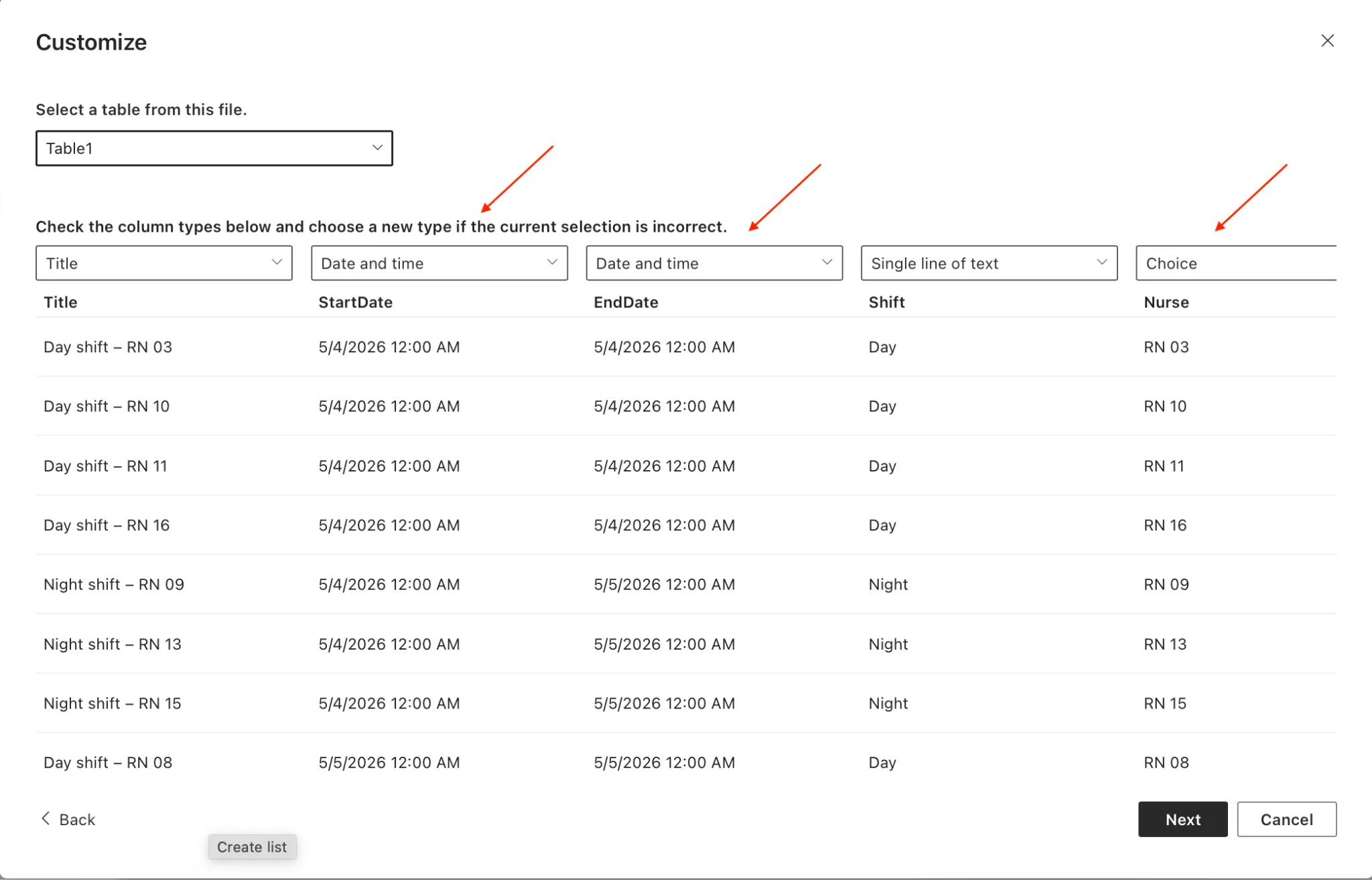
Pic. 1. Choosing column types during import — Nurse as Choice unlock color-coding.
Step 2 — Add the List to the Virto Calendar App
- In the Virto Calendar App, click Create new Calendar icon.
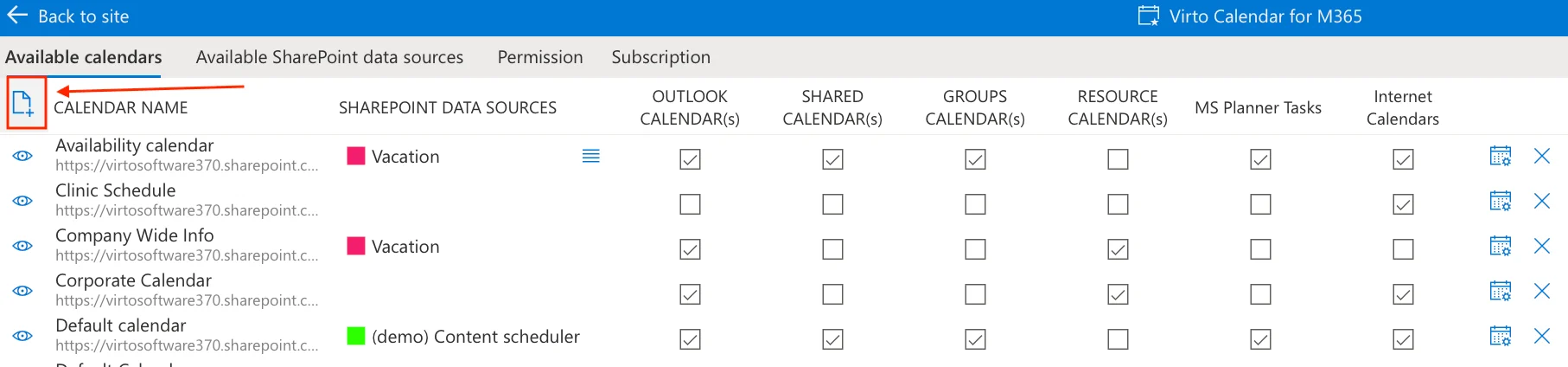
Pic. 2. Creating a new calendar in the Virto Calendar App.
- Choose “Create New SharePoint Data Source.”
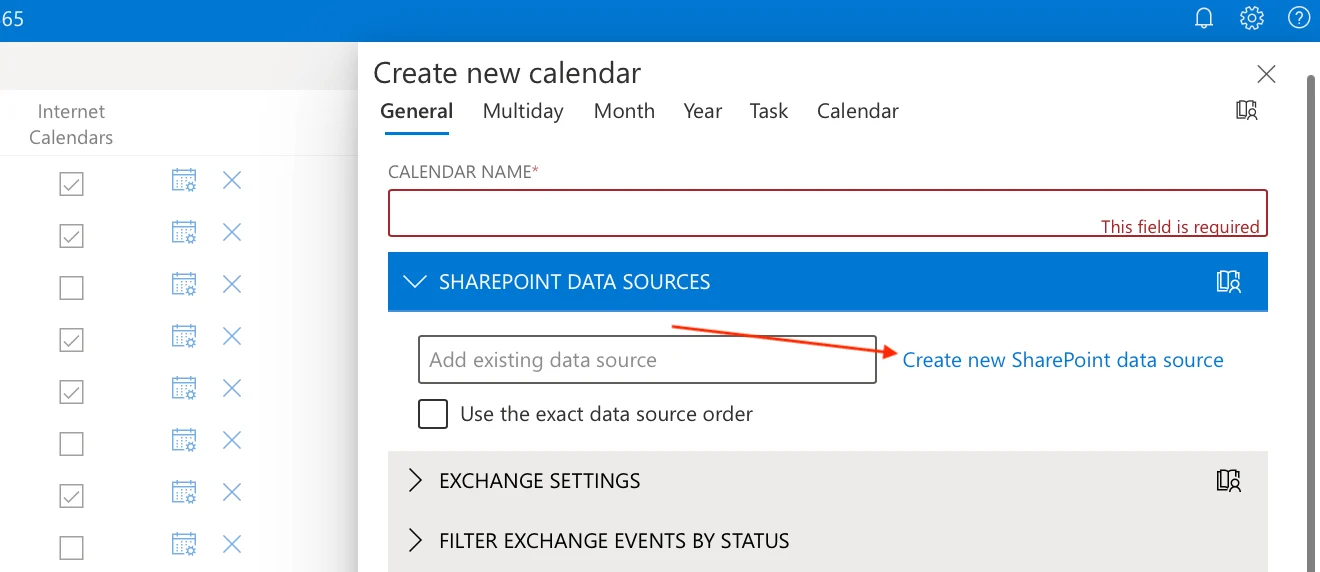
Pic. 3. Creating a new SharePoint data source in the Virto Calendar App.
- Give your Data Source a name and select your imported list.
- Map fields: Title → Title, Start → StartDate, End → EndDate.
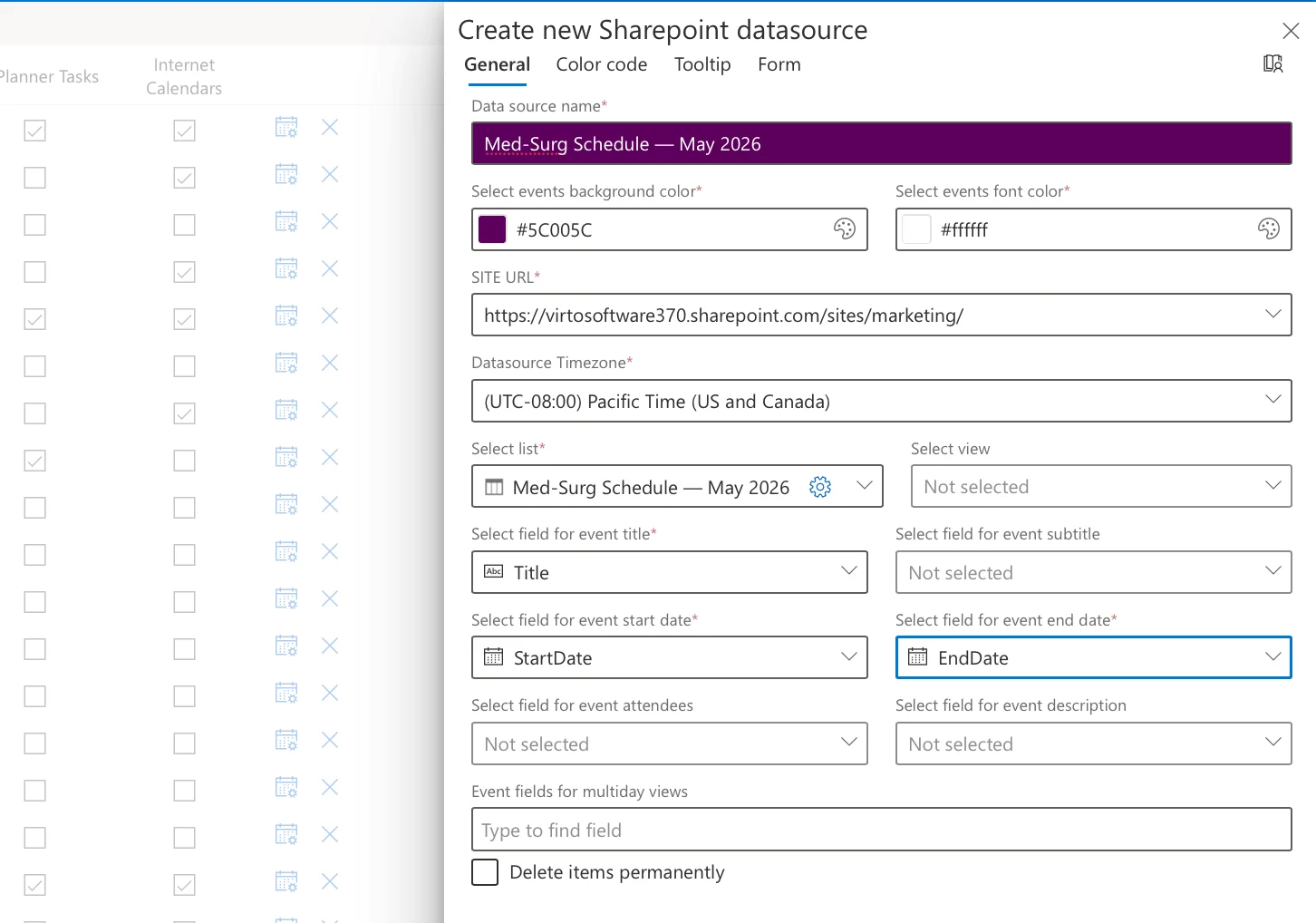
Pic. 4. Mapping fields in the Virto Calendar App.
- Open the Color-Coding settings and pick the Choice column to drive colors — Nurse for one color per staff member, or Shift for a simple day/night palette.
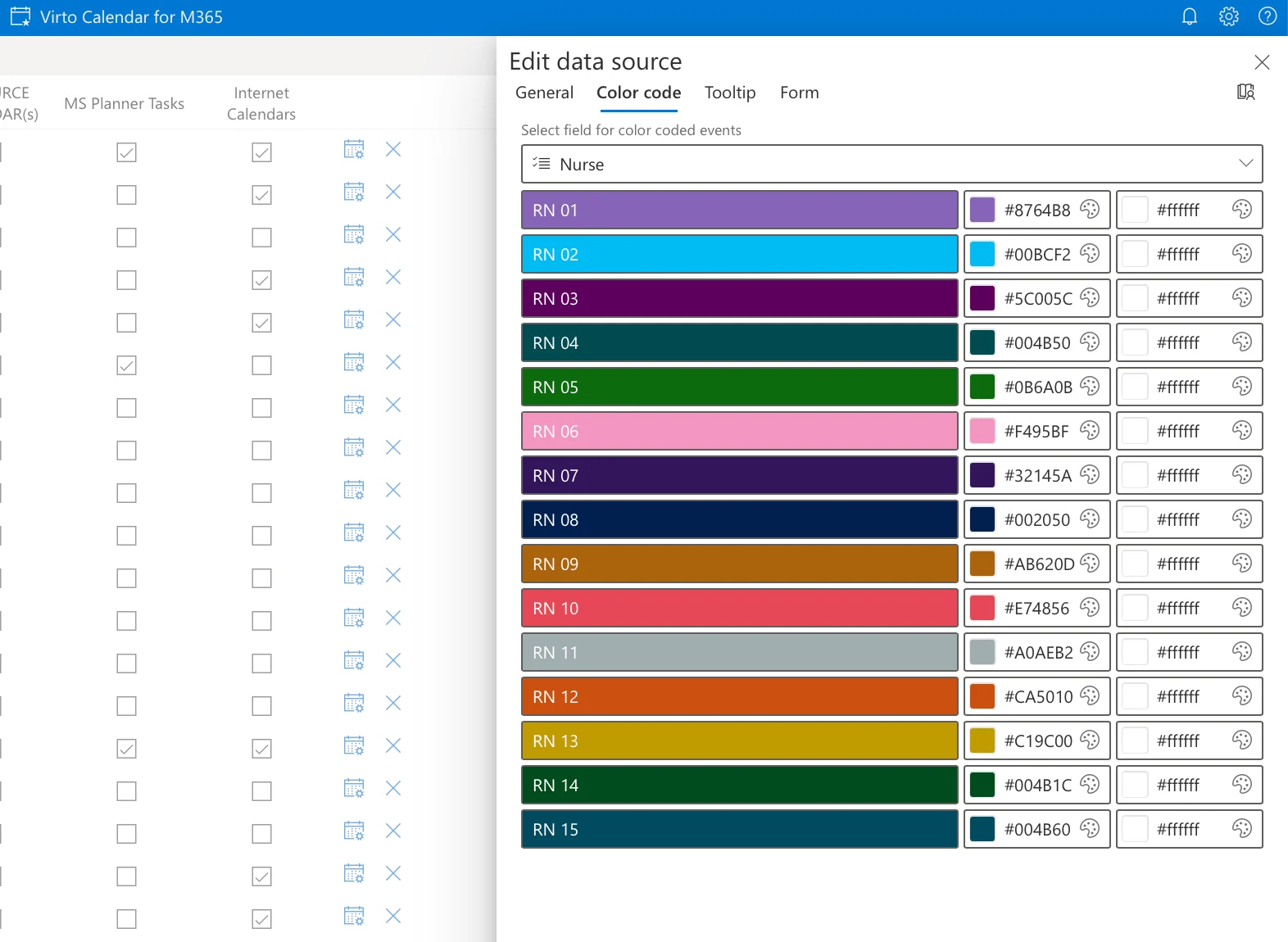
Pic. 5. Color-coding in the Virto Calendar App.
- Save.
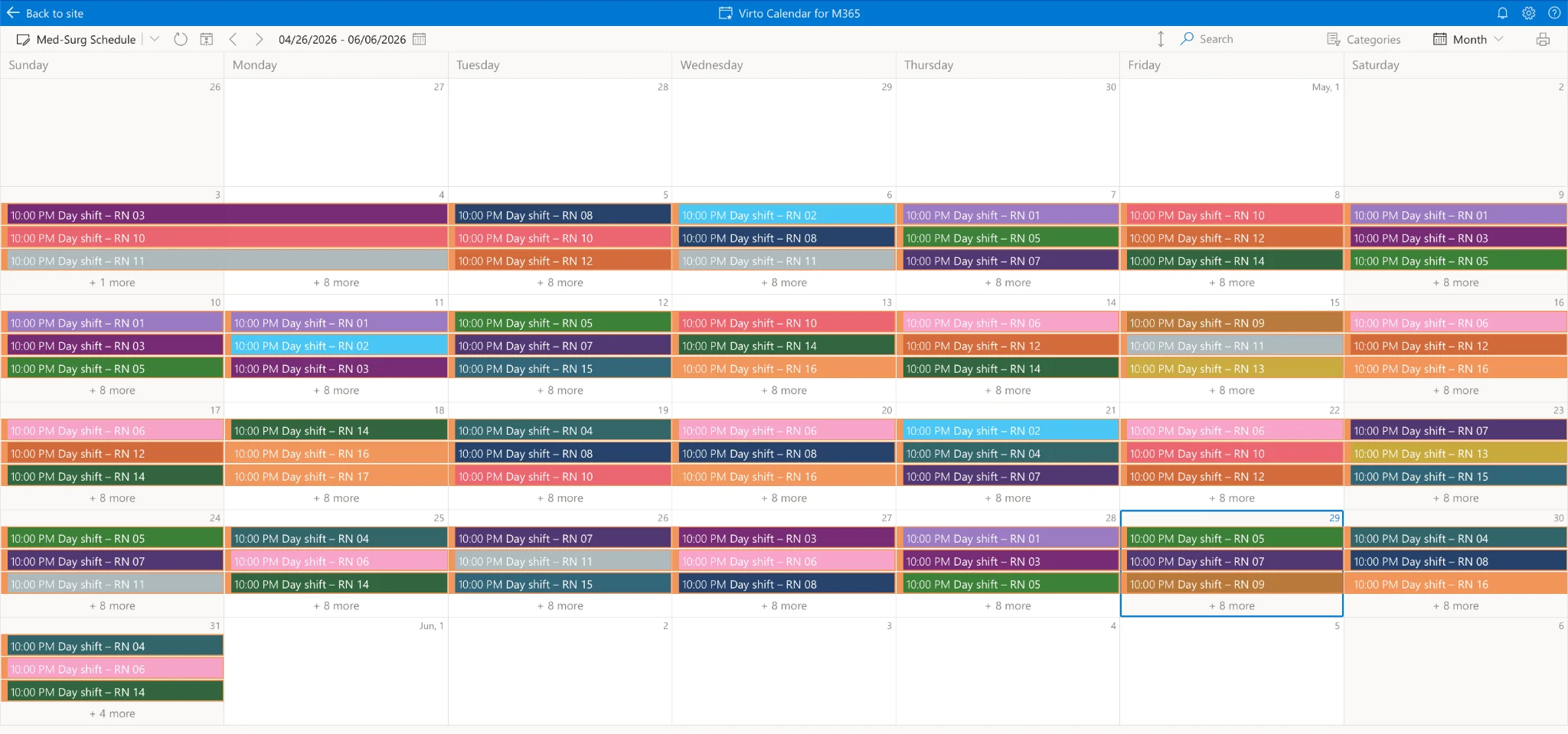
Pic. 6. Color-coded calendar in the Virto Calendar App.
Step 3 — Share with Your Unit
- Embed the calendar as a SharePoint page widget.
- Add it as a Teams tab in your unit’s channel.
- When color-coded by Nurse, each staff member sees their own shifts in a distinct colour; when color-coded by Shift, the unit reads day vs. night at a glance.
- Charge-nurse roles can be highlighted with a second view if you add a Role Choice column.
Step 4 — Set Automated Reminders
Pair the Virto Calendar App with the Virto Alerts & Reminders App to send automatic shift reminders 24 and 2 hours before each shift — reducing no-shows.
Try the Virto Calendar App for SharePoint Online & Microsoft 365 — free for one month.
Nurse Scheduling Software: Top Solutions Compared
If you need an ongoing system rather than a one-off rota, dedicated software is worth comparing. Below are the most widely used options, from enterprise platforms to nurse-focused tools.
Kronos Workforce Scheduler (UKG)
Built for large hospitals and multi-location networks that need deep customization and high compliance standards. Supports complex multi-site scenarios, rule-based shift generation, and predictive analytics, and integrates with ERP, HRIS, and time-and-attendance systems. Best for large health systems; downside is high implementation and maintenance cost.
Shiftboard
Flexible scheduling for mid-size and large facilities, with strong self-scheduling, shift trades, and workforce communication. Highly scalable. Best for hospitals that want a balance between automation and flexibility.
Deputy
A lightweight, intuitive tool often chosen by small clinics and private practices. Simple setup and a friendly mobile app cover essential scheduling, time tracking, and notifications, but advanced enterprise functionality is limited.
Nursa
A US-focused marketplace for posting open shifts and filling them with available clinicians. Best when your challenge is per-diem fill rather than building the master rota.
Rosterlab
AI-first rostering that generates complex hospital rosters from scratch against your rules. Strong for units with intricate skill-mix and ratio constraints; typically available via demo.
ShiftWizard
A healthcare-only, KLAS-recognized nurse scheduling platform focused on hospital staffing workflows and acuity-based assignments.
Virto Calendar App for SharePoint Online & Microsoft 365 / Microsoft Teams
The Virto Calendar App fits hospitals already on Microsoft 365. The SharePoint Online & Microsoft 365 version centralizes scheduling inside SharePoint with Outlook and Power BI synchronization; the Microsoft Teams version brings shift planning and confirmations directly into Teams. Best for organizations that use Microsoft 365 as their core collaboration environment.
| Solution | Best for | Price | Integration | Mobile |
|---|---|---|---|---|
| Kronos (UKG) | Large hospitals, networks | $$$$ | ERP, HRIS, T&A, BI | Yes |
| Shiftboard | Mid-size & large hospitals | $$$ | HRIS, Calendar, BI, Email | Yes |
| Deputy | Small clinics, practices | $$ | Calendar, Payroll | Yes |
| Nursa | Per-diem shift fill (US) | Per shift | Marketplace app | Yes |
| Rosterlab | Complex AI rosters | $$$ | API, exports | Yes |
| ShiftWizard | Hospital nurse scheduling | $$$ | EHR, HRIS | Yes |
| Virto Calendar App | Microsoft 365 hospitals | $$–$$$ | Teams, Outlook, SharePoint, Power BI | Yes |
Fig. 2. Nurse scheduling software overview.
Why Nurse Scheduling Software Matters: Benefits & Compliance
Coordinating around-the-clock coverage by hand invites overlapping shifts, understaffed units, and avoidable overtime. Dedicated software removes most of that risk by automating shift planning while accounting for qualifications, preferences, and labor rules. The practical benefits are concentrated in four areas:
- Fewer errors and less manual work — automated validation prevents overlapping shifts, overtime violations, and conflicts.
- Fair, balanced distribution — transparent rules spread workload evenly and mix experienced and junior nurses across shifts.
- Individualized scheduling — nurses set shift and day-off preferences, and the system matches certifications to specialized units.
- Compliance and reporting — rules for shift duration, rest periods, and weekend rotation are enforced automatically, simplifying audits.
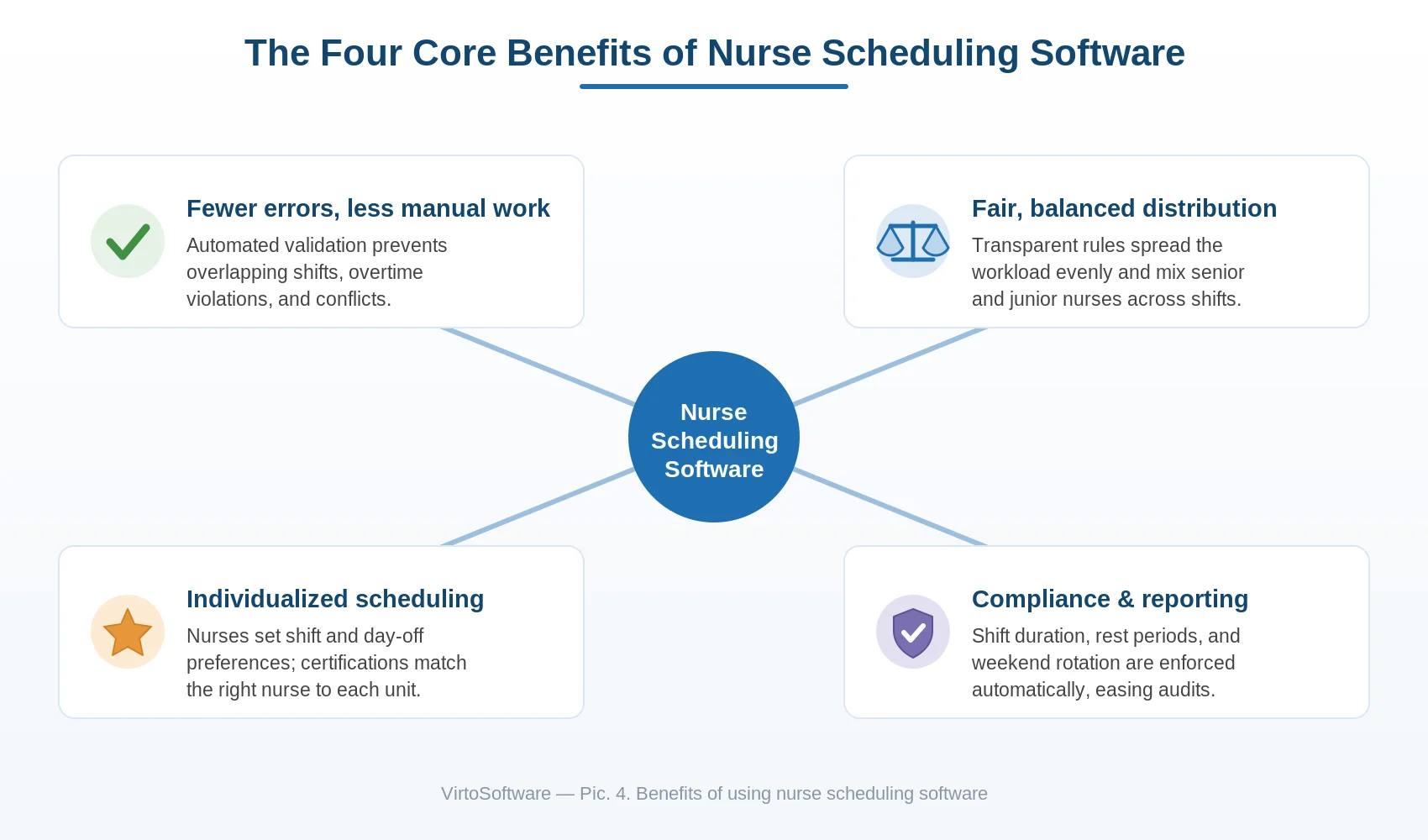
Pic. 7. Benefits of using nurse scheduling software.
On the compliance side, any tool handling clinical staffing data should meet HIPAA (U.S.), GDPR (EU), and ISO 27001 standards, with role-based access, audit logs, and encryption. For a broader view across care settings, see our healthcare scheduling software guide and clinic scheduling solutions.
Self-Scheduling for Nurses: Best Practices
Self-scheduling lets nurses choose shifts from an open window that management defines — required coverage, qualification levels, and compliance limits stay fixed, while staff book the slots that fit their lives. It works best in 24/7 environments and, when paired with rule-based validation, stays flexible without becoming chaotic.
How to make your own schedule as a nurse
- Log into your scheduling system and open the self-scheduling window.
- Review the available shifts released by your manager.
- Select shifts that balance day, evening, and night hours and respect coverage needs.
- Submit for approval or request a swap with a colleague through the system.
Tips for effective self-scheduling
- Balance recovery time — avoid stacking long or night shifts without adequate rest.
- Coordinate with peers so coverage stays even and no shift goes understaffed.
- Enable reminders so you never miss a shift or a scheduling deadline.
- Stay within policy — check weekly-hour caps and night-shift limits before booking.
If your hospital doesn’t yet have self-scheduling, the Virto Calendar App supports open-window self-scheduling within SharePoint. For the same workflow applied to schools, see our AI school timetable maker guide.
Integration with Microsoft 365 — The Virto Approach
For hospitals already on Microsoft 365, the Virto Calendar App is the most natural way to publish and manage nurse schedules — no third-party platform required. Pick the version that matches how your team works:
| Your role | Recommended option | Why |
|---|---|---|
| Hospital IT / admins (M365 deployed) | Virto Calendar App for SharePoint Online & Microsoft 365 | Central scheduling in SharePoint, synced to Outlook and Power BI |
| Charge nurses / unit managers (live in Teams) | Virto Calendar App for Microsoft Teams | View, update, and confirm shifts without leaving Teams |
| Small clinics (no SharePoint) | Virto Shared Calendar | Lightweight shared calendar, free for up to 15 entries |
Concrete points worth knowing:
- Free 30-day trial.
- Self-hosted deployment in your own Azure subscription — HIPAA-relevant for US hospitals, since scheduling data never leaves your compliant cloud.
- Integration with Microsoft Planner tasks for cross-unit project work.
- Cross-platform — works on phone, desktop, and inside a Teams channel.
- Automated reminders via the Virto Alerts & Reminders App to cut no-shows.
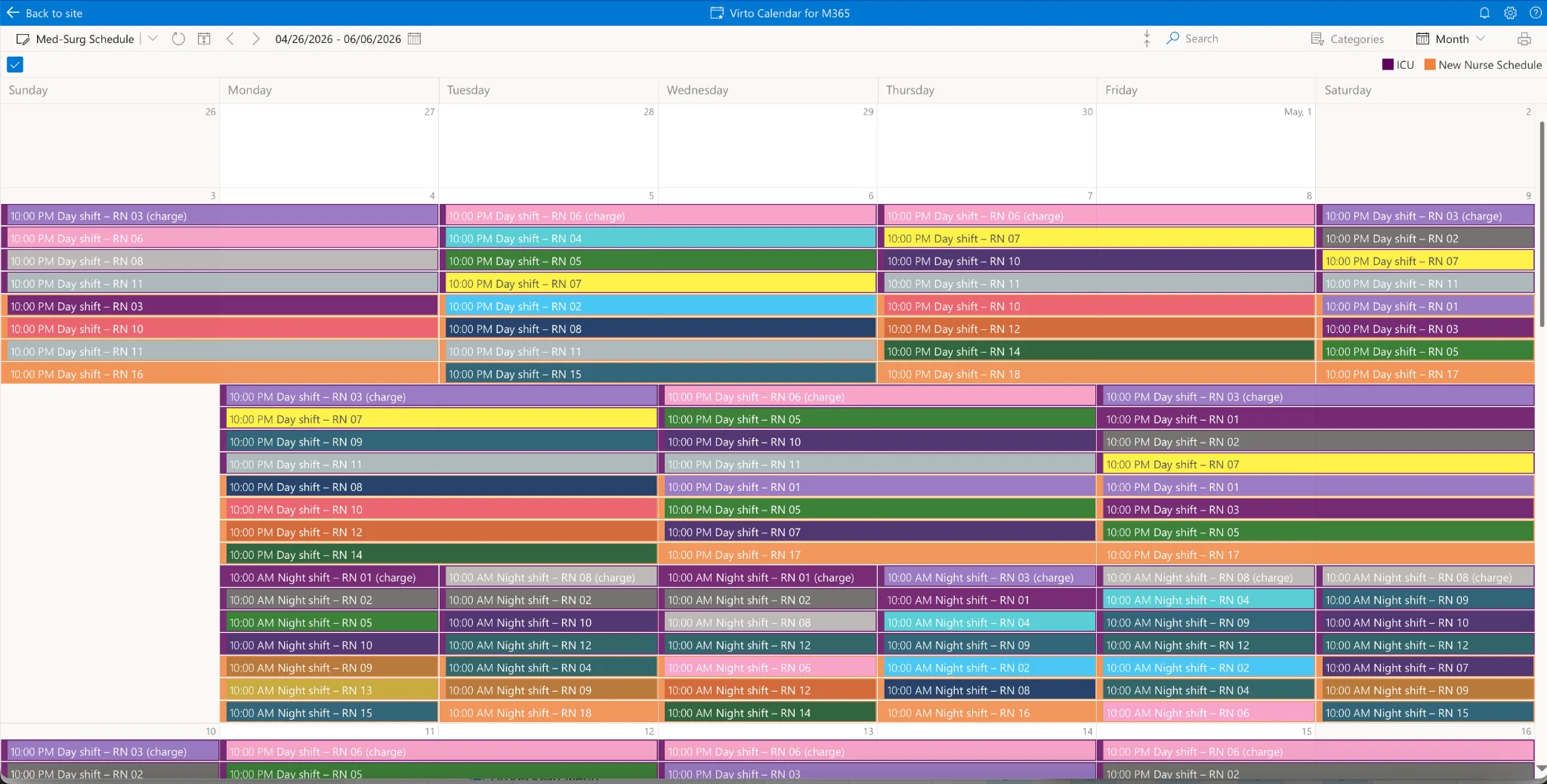
Pic. 8. A real nurse schedule in the Virto Calendar App (Med-Surg + ICU overlaid, color-coded by shift).
Explore related tools: the Virto Calendar App for Microsoft Teams, Virto Shared Calendar, and the Virto Alerts & Reminders App. For shift-based teams beyond nursing, see our shift scheduling software guide and the AI scheduling assistant hub.
AI and Machine Learning in Modern Scheduling Solutions
Beyond the prompt-based workflow above, dedicated platforms increasingly embed AI directly. These systems analyze historical workforce data — who tends to take nights, which months see higher sick leave, which days bring peak patient loads — and refine their suggestions over time. During seasonal surges they can forecast demand and propose reserve coverage in advance, and when someone calls in sick they instantly recommend qualified replacements based on certifications and availability. The result is scheduling that shifts from reactive firefighting to proactive workforce planning.
Frequently Asked Questions
How do I make a nurse schedule with AI?
Pick a free AI tool (ChatGPT, Claude, Copilot, or Gemini), write a prompt with your unit’s constraints (number of nurses, shift pattern, RN-to-patient ratio, certifications, PTO), review and iterate to fix conflicts, export as an .xlsx file (most tools with file generation do this directly; otherwise ask for CSV and save as .xlsx), and import into Microsoft 365 via a SharePoint list and the Virto Calendar App. The full step-by-step workflow with four ready-to-use prompts is above.
What is the best nurse scheduling software?
It depends on hospital size. Kronos (UKG) is best for large health systems with complex multi-site needs. Shiftboard suits mid-size hospitals that need self-scheduling flexibility. Deputy is best for small clinics. For hospitals already on Microsoft 365, the Virto Calendar App provides the most integrated experience across SharePoint, Outlook, and Teams.
Can AI create a nurse schedule for free?
Yes. ChatGPT, Claude, Microsoft Copilot, and Google Gemini all offer free tiers capable of generating nurse schedules for units up to about 40 nurses. Tools with file generation can return a downloadable .xlsx directly; otherwise the output is a CSV you save as .xlsx and import into your hospital’s calendar system. Free general-purpose AI handles 12-hour shifts, RN-to-patient ratios, weekend rotation, and certification constraints when you include them in the prompt.
How do I make my own schedule as a nurse?
Use a self-scheduling system if your hospital has one (Kronos, Shiftboard, or the Virto Calendar App all support open-window self-scheduling). Log in, view available shifts, select your preferred ones within management’s rules, and submit. If your hospital lacks self-scheduling, ask your unit manager to consider the Virto Calendar App for Microsoft 365, which supports self-scheduling within SharePoint.
Is nurse scheduling software HIPAA-compliant?
Most enterprise nurse scheduling software (Kronos, Shiftboard, ShiftWizard) is built with HIPAA in mind, but verify with each vendor. For organizations on Microsoft 365, the Virto Calendar App can be deployed in your own Azure subscription — so scheduling data never leaves your HIPAA-compliant cloud. Confirm your hospital’s data-residency requirements before choosing any solution.
How does Microsoft 365 integration work for nurse scheduling?
Nurse schedules stored as SharePoint lists can be displayed in the Virto Calendar App, which renders them as visual calendars on SharePoint pages or as Microsoft Teams tabs. Nurses see their shifts in Outlook automatically. Power Automate handles approval workflows for shift swaps and PTO, and the Virto Alerts & Reminders App sends shift reminders via Teams and email.
Conclusion
You no longer have to choose between an expensive platform and a manual spreadsheet. A free AI assistant can draft a compliant, balanced nurse schedule in under an hour, and the Virto Calendar App for Microsoft 365 turns that .xlsx into a live, shareable calendar your nurses already know how to use. Start with the prompts above, import the result, and add automated reminders — then scale up to dedicated software only when your hospital’s complexity truly demands it.